【翻译】【NodeJS】事件循环中的Microtask和Macrotask
借助 AI 翻译自Event loop: microtasks and macrotasks,以供打下基础学习 Pi Coding Agent 代码
Browser JavaScript execution flow, as well as in Node.js, is based on an event loop.
浏览器以及 Node.js 中的 JavaScript 执行流程都基于事件循环(event loop)。
Understanding how event loop works is important for optimizations, and sometimes for the right architecture.
理解 event loop 的工作原理对于性能优化十分重要,有时对于搭建合理的架构也同样关键。
In this chapter we first cover theoretical details about how things work, and then see practical applications of that knowledge.
在本章中,我们首先介绍相关原理的理论细节,之后再讲解该知识的实际应用。
Event Loop
The event loop concept is very simple. There’s an endless loop, where the JavaScript engine waits for tasks, executes them and then sleeps, waiting for more tasks.
event loop 这个概念十分简单。存在一个无限循环,JavaScript 引擎在此循环中等待任务、执行任务,之后进入休眠,继续等待更多任务。
The general algorithm of the engine:
该引擎的通用算法:
- While there are tasks:
- execute them, starting with the oldest task.
Sleep until a task appears, then go to 1.
当有任务时:
- 执行这些任务,从最早的任务开始。
- 休眠直至出现任务,然后回到步骤1。
That’s a formalization of what we see when browsing a page. The JavaScript engine does nothing most of the time, it only runs if a script/handler/event activates.
当我们浏览一个网页时就是上述这种形式。JavaScript 引擎大多数时间处于空闲状态,仅当 script/handler/event 触发时才会运行。
Examples of tasks:
任务示例:
- When an external script
<script src="...">loads, the task is to execute it. - When a user moves their mouse, the task is to dispatch
mousemoveevent and execute handlers. - When the time is due for a scheduled
setTimeout, the task is to run its callback. …and so on.
当外部 script
<script src="。。。">加载完成后,对应的任务就是执行该 script。- 当用户移动鼠标时,对应的任务就是派发
mousemove事件并执行事件处理函数(handler)。 - 当
setTimeout预定的时间到达时,对应的任务就是运行它的回调函数(callback)。 - 诸如此类。
Tasks are set – the engine handles them – then waits for more tasks (while sleeping and consuming close to zero CPU).
任务被设置好 —— 引擎处理这些任务 —— 随后等待更多任务(在此期间处于休眠状态,CPU消耗几乎为零)。
It may happen that a task comes while the engine is busy, then it’s enqueued.
有可能出现这种情况:引擎正忙的时候来了一个任务,这时该任务就会进入队列排队。
The tasks form a queue, the so-called “macrotask queue” (v8 term):
这些任务会组成一个队列,即所谓的”macrotask 队列”(V8 术语):
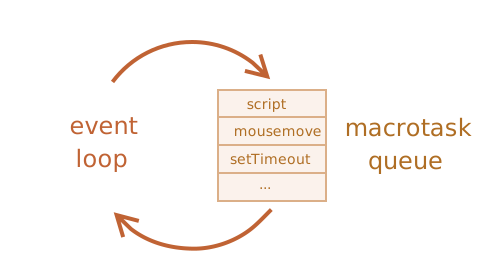
For instance, while the engine is busy executing a script, a user may move their mouse causing mousemove, and setTimeout may be due and so on, these tasks form a queue, as illustrated in the picture above.
例如,当引擎正在执行一段 scirpt 时,用户可能移动鼠标触发mousemove事件,同时setTimeout也可能到期触发,诸如此类。这些任务会形成一个队列,如上图所示。
Tasks from the queue are processed on a “first come – first served” basis. When the engine browser is done with the script, it handles mousemove event, then setTimeout handler, and so on.
队列中的任务按照 “先来先服务” 的原则进行处理。当引擎浏览器执行完script后,会处理mousemove事件,接着执行setTimeout回调函数,以此类推。
So far, quite simple, right?
到目前为止,相当简单,对吧?
Two more details:
两个细节:
- Rendering never happens while the engine executes a task. It doesn’t matter if the task takes a long time. Changes to the DOM are painted only after the task is complete.
- If a task takes too long, the browser can’t do other tasks, such as processing user events. So after some time, it raises an alert like “Page Unresponsive”, suggesting killing the task with the whole page. That happens when there are a lot of complex calculations or a programming error leading to an infinite loop.
- 引擎执行任务期间绝不会进行渲染(render)。无论该任务耗时多久都是如此。对 DOM 的变更只会在任务完成后才会绘制到页面上。
- 如果某个任务耗时过长,浏览器就无法执行其他任务,例如处理用户事件(user event)。因此一段时间后,浏览器会弹出类似“页面无响应”的警告,提示关闭整个页面来终止该任务。当存在大量复杂计算,或是出现引发无限循环的程序错误时,就会发生这种情况。
That was the theory. Now let’s see how we can apply that knowledge.
理论部分就讲到这里。现在我们来看看如何运用这些知识。
Use-case 1: splitting CPU-hungry tasks 拆分高 CPU 占用任务
Let’s say we have a CPU-hungry task.
假设我们有一个占用大量CPU资源的任务。
For example, syntax-highlighting (used to colorize code examples on this page) is quite CPU-heavy. To highlight the code, it performs the analysis, creates many colored elements, adds them to the document – for a large amount of text that takes a lot of time.
例如,语法高亮(用于为本页的代码示例上色)会占用相当多的CPU资源。为实现代码高亮,程序需要执行解析分析,生成大量带颜色的元素,并将其添加到 DOM 中 —— 如果文本体量很大,该过程会耗费大量时间。
While the engine is busy with syntax highlighting, it can’t do other DOM-related stuff, process user events, etc. It may even cause the browser to “hiccup” or even “hang” for a bit, which is unacceptable.
当引擎忙于语法高亮时,就无法处理其他 DOM 相关操作、响应用户事件等。这甚至可能造成浏览器短暂卡顿、假死,这是无法接受的。
We can avoid problems by splitting the big task into pieces. Highlight the first 100 lines, then schedule setTimeout (with zero-delay) for the next 100 lines, and so on.
我们可以把大任务拆分成小块来规避问题。先高亮前 100 行,然后通过零延迟的 setTimeout 调度处理接下来的 100 行,以此类推。
To demonstrate this approach, for the sake of simplicity, instead of text-highlighting, let’s take a function that counts from 1 to 1000000000.
为演示该方法,出于简洁考虑,我们不采用文本高亮,而是使用一个从1计数到1000000000的函数。
If you run the code below, the engine will “hang” for some time. For server-side JS that’s clearly noticeable, and if you are running it in-browser, then try to click other buttons on the page – you’ll see that no other events get handled until the counting finishes.
如果你运行下面这段代码,引擎会 “挂起” 一段时间。对于服务端 JavaScript 来说,该现象会十分明显;如果你在浏览器环境中运行它,尝试点击页面上的其他按钮就会发现,在计数完成之前,其他任何事件都不会被处理。
1 | let i = 0; |
The browser may even show a “the script takes too long” warning.
浏览器甚至可能弹出 “script 运行时间过长” 的警告。
Let’s split the job using nested setTimeout calls:
让我们使用嵌套的setTimeout调用来拆分这项任务:
1 | let i = 0; |
Now the browser interface is fully functional during the “counting” process.
现在浏览器界面在 “计数” 过程中可以正常使用。
A single run of count does a part of the job (*), and then re-schedules itself (**) if needed:
单次执行count会完成(*)部分工作,之后如有需要会重新调度自身(**):
- First run counts:
i=1...1000000. - Second run counts:
i=1000001..2000000. - …and so on.
Now, if a new side task (e.g. onclick event) appears while the engine is busy executing part 1, it gets queued and then executes when part 1 finished, before the next part. Periodic returns to the event loop between count executions provide just enough “air” for the JavaScript engine to do something else, to react to other user actions.
如果 JS 引擎正在执行第 1 部分代码时,来了一个新的附加任务(例如 onclick 点击事件),该任务会进入队列排队;等第 1 部分执行完毕后,在下一段代码开始之前,就会执行这个排队任务。在 count 多次执行的间隙,周期性交还控制权给事件循环,给 JS 引擎留出足够 “喘息空隙”,以此响应其他用户操作。
The notable thing is that both variants – with and without splitting the job by setTimeout – are comparable in speed. There’s not much difference in the overall counting time.
值得注意的是,两种实现方案 —— 无论是否通过setTimeout拆分任务,运行速度都相差不大。整体计数时间没有明显差异。
To make them closer, let’s make an improvement.
为了使两者耗时更接近,让我们来做一个改进。
We’ll move the scheduling to the beginning of the count():
我们会将调度逻辑移至count()的开头:
1 | let i = 0; |
Now when we start to count() and see that we’ll need to count() more, we schedule that immediately, before doing the job.
现在,当我们开始执行 count(),并且判断出后续还需要继续调用 count() 时,我们会在执行计数任务之前,就立刻调度安排好后续的 count() 操作。
If you run it, it’s easy to notice that it takes significantly less time.
如果你运行它,很容易就能注意到它耗时明显更短。
Why?
That’s simple: as you remember, there’s the in-browser minimal delay of 4ms for many nested setTimeout calls. Even if we set 0, it’s 4ms (or a bit more). So the earlier we schedule it – the faster it runs.
道理很简单:你应该记得,对于多层嵌套的setTimeout调用,浏览器内部存在 4 毫秒的最小延迟。即便我们设置为0,实际延迟依旧是4 毫秒(或者略长一点)。所以调度得越早,代码执行得就越快。
AI解释为什么会快
- 第一种情况: - 第 0ms:开始执行 count() 的代码。 - 第 0ms ~ 5ms:主线程忙着跑代码。 - 第 5ms:代码跑完了,此时才调用 setTimeout,浏览器开始计时(4ms)。 - 第 5ms ~ 9ms:主线程空闲,但没办法,必须干等这 4ms 的浏览器最低延时。 - 第 9ms:计时结束,下一次 count() 开始执行。 - 每一轮迭代耗时 = 5ms(干活) + 4ms(干等) = 9ms。 - 第二种情况: - 第 0ms:刚进函数,立刻调用 setTimeout,浏览器开始计时(4ms)。 - 第 0ms ~ 5ms:主线程继续往下跑 count() 的代码(干活)。 - 第 4ms:浏览器的 4ms 计时结束,但主线程还在忙(还在跑第 5ms 的代码),所以回调只能先排队等着。 - 第 5ms:代码跑完了,主线程空闲。因为计时器在第 4ms 就已经到期了,所以无需任何等待,主线程立刻把排队中的下一次 count() 拉进来执行。 ---Finally, we’ve split a CPU-hungry task into parts – now it doesn’t block the user interface. And its overall execution time isn’t much longer.
最后,我们将这个高 CPU 占用任务拆分成了多个部分 —— 现在它不会阻塞用户界面,并且其整体执行时间也没有增加太多。
Use case 2: progress indication 进度提示
Another benefit of splitting heavy tasks for browser scripts is that we can show progress indication.
将浏览器 script 的繁重任务进行拆分的另一个好处是,我们可以展示进度提示。
As mentioned earlier, changes to DOM are painted only after the currently running task is completed, irrespective of how long it takes.
如前文所述,对 DOM 的变更只会在当前执行任务完成后才会进行渲染,无论该任务耗时多久。
On one hand, that’s great, because our function may create many elements, add them one-by-one to the document and change their styles – the visitor won’t see any “intermediate”, unfinished state. An important thing, right?
一方面,这十分有利,因为我们的函数可以创建大量元素,将它们逐个添加到 DOM 中并修改其样式,访问者不会看到任何“中间的”、未完成的状态。这一点很重要,对吧?
Here’s the demo, the changes to i won’t show up until the function finishes, so we’ll see only the last value:
这是演示示例:对i的修改要等到函数执行完毕后才会显现,因此我们只会看到最后一个值:
1 | <div id="progress"></div> |
…But we also may want to show something during the task, e.g. a progress bar.
……但我们可能也希望在任务执行期间展示某些内容,例如进度条。
If we split the heavy task into pieces using setTimeout, then changes are painted out in-between them.
如果我们使用setTimeout将繁重任务拆分成多个片段,那么页面变更就会在这些片段执行间隙完成渲染。
This looks prettier:
这个看起来更好看:
1 | <div id="progress"></div> |
Now the <div> shows increasing values of i, a kind of a progress bar.
现在<div>会显示不断增大的i值,充当一种进度条。
Use case 3: doing something after the event
In an event handler we may decide to postpone some actions until the event bubbled up and was handled on all levels. We can do that by wrapping the code in zero delay setTimeout.
在事件处理函数(event handler)中,有时我们想等事件完全冒泡结束、各层级都处理完毕后,再去执行某些操作。要实现这个效果,只需把这部分代码包裹在一个延迟为 0 的 setTimeout 里即可。
AI: 在前端开发中,事件触发后会向上层元素一层层“冒泡”传递。如果你写了 setTimeout(fn, 0),浏览器会把 fn 放到异步任务队列末尾,等当前所有正在冒泡执行的同步事件处理代码全部跑完之后,再去执行你的 fn。
In the chapter Dispatching custom events we saw an example: custom event menu-open is dispatched in setTimeout, so that it happens after the “click” event is fully handled.
在《Dispatching custom events》那一章我们见过一个例子:自定义事件 menu‑open 在 setTimeout 里派发(dispatch),以此保证它在 click 事件完整处理完毕之后才执行。
1 | menu.onclick = function() { |
Macrotasks and Microtasks
Along with macrotasks, described in this chapter, there are microtasks, mentioned in the chapter Microtasks.
除了本章介绍的 macrotask 之外,还有在 microtasks 章节中提到的 microtask。
Microtasks come solely from our code. They are usually created by promises: an execution of .then/catch/finally handler becomes a microtask. Microtasks are used “under the cover” of await as well, as it’s another form of promise handling.
Microtask 完全来源于我们的代码。它们通常由 Promise 创建:执行 .then/catch/finally 处理函数就会产生一个 microtask。await 的底层同样会使用 microtask,因为它是另一种 Promise 处理形式。
There’s also a special function queueMicrotask(func) that queues func for execution in the microtask queue.
还有一个特殊函数 queueMicrotask (func),它会将 func 加入 microtask 队列等待执行。
Immediately after every macrotask, the engine executes all tasks from microtask queue, prior to running any other macrotasks or rendering or anything else.
每一个 macrotask 执行完毕后,引擎会优先执行 microtask 队列中的全部任务,之后才会运行其他 macrotask、执行渲染或是处理其他操作。
For instance, take a look:
示例:
1 | setTimeout(() => alert("timeout")); |
What’s going to be the order here?
这里会是什么顺序?
codeshows first, because it’s a regular synchronous call.promiseshows second, because.thenpasses through the microtask queue, and runs after the current code.timeoutshows last, because it’s a macrotask.
code最先输出,因为它是普通的同步调用。
2。promise第二个输出,因为。then进入 microtask 队列,会在当前代码执行完毕后运行。
3。timeout最后输出,因为它属于 macrotask。
The richer event loop picture looks like this (order is from top to bottom, that is: the script first, then microtasks, rendering and so on):
event loop 的完整流程如下(执行顺序自上而下,即:script 优先执行,随后是 microtask、渲染等):
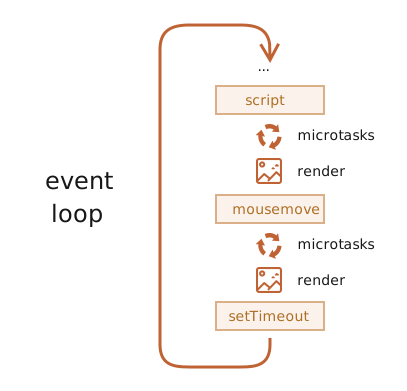
All microtasks are completed before any other event handling or rendering or any other macrotask takes place.
所有 microtask 会在任何其他事件处理(other event handler)、渲染或是任何其他 macrotask 执行之前完成。
That’s important, as it guarantees that the application environment is basically the same (no mouse coordinate changes, no new network data, etc) between microtasks.
这一点很重要,因为它保证各个 microtask 之间,应用程序环境基本保持一致(鼠标坐标不会变化、不会产生新的网络数据,诸如此类)。
If we’d like to execute a function asynchronously (after the current code), but before changes are rendered or new events handled, we can schedule it with queueMicrotask.
如果我们想要异步执行一个函数(在当前代码执行完毕后),但又要在页面渲染变更或处理新事件之前执行,可以使用queueMicrotask来调度该函数。
Here’s an example with “counting progress bar”, similar to the one shown previously, but queueMicrotask is used instead of setTimeout. You can see that it renders at the very end. Just like the synchronous code:
这里有一个 “计数进度条” 的示例,和之前展示的示例类似,但此处使用queueMicrotask而非setTimeout。可以看到它会在最后时刻才完成渲染,表现与同步代码一致:
1 | <div id="progress"></div> |
Summary
A more detailed event loop algorithm (though still simplified compared to the specification):
一个更为详尽的事件循环算法(不过相较于规范版本依旧做了简化):
- Dequeue and run the oldest task from the macrotask queue (e.g. “script”).
- Execute all microtasks:
- While the microtask queue is not empty:
- Dequeue and run the oldest microtask.
- While the microtask queue is not empty:
- Render changes if any.
- If the macrotask queue is empty, wait till a macrotask appears.
- Go to step 1.
1。 从 macrotask 队列取出并执行最早的任务(例如 script)。
- 执行所有 microtask:
- 当 microtask 队列不为空时:
- 取出并执行最早的 microtask。
- 当 microtask 队列不为空时:
- 如有变更,执行渲染。
- 若 macrotask 队列为空,则等待 macrotask 进入队列。
- 回到步骤1。
To schedule a new macrotask:
要调度一个新的 macrotask:
- Use zero delayed
setTimeout(f).
That may be used to split a big calculation-heavy task into pieces, for the browser to be able to react to user events and show progress between them.
这可用于将高计算量任务拆分成多个片段,以便浏览器能够响应用户事件,并在各个片段执行间隙展示进度。
Also, used in event handlers to schedule an action after the event is fully handled (bubbling done).
此外,可用于事件处理程序(event handler)中,在事件完全处理完毕(冒泡结束)后调度执行某项操作。
To schedule a new microtask
要调度一个新的 microtask:
- Use
queueMicrotask(f). - Also promise handlers go through the microtask queue.
- 另外,Promise 的回调处理函数会进入 microtask 队列。
There’s no UI or network event handling between microtasks: they run immediately one after another.
Microtask 之间不会处理 UI 或网络事件:它们会接连不断地立即执行。
So one may want to queueMicrotask to execute a function asynchronously, but within the environment state.
因此,开发者可能希望使用queueMicrotask来异步执行函数,但要保持在当前环境状态下。
Web Workers
For long heavy calculations that shouldn’t block the event loop, we can use Web Workers.
对于不应阻塞 event loop 的长时间高负载计算,我们可以使用 Web Workers。
That’s a way to run code in another, parallel thread.
这是一种在另一个并行线程中运行代码的方式。
Web Workers can exchange messages with the main process, but they have their own variables, and their own event loop.
Web Worker 可以和主线程互相交换消息,但它们拥有独立的变量以及独立的事件循环。
Web Workers do not have access to DOM, so they are useful, mainly, for calculations, to use multiple CPU cores simultaneously.
Web Workers 无法访问 DOM,因此它们主要适用于计算任务,可同时利用多个 CPU 内核。
More
1 | console.log('1'); // 同步任务 |
如果你用 async/await,它们本质上是 Promise 的语法糖,关系如下:
1 | async function test() { |
1 | console.log(1); |
One go-around of the event loop will have exactly one task being processed from the macrotask queue (this queue is simply called the task queue in the WHATWG specification). After this macrotask has finished, all available microtasks will be processed, namely within the same go-around cycle. While these microtasks are processed, they can queue even more microtasks, which will all be run one by one, until the microtask queue is exhausted.
event loop 的每一轮循环,只会从 macrotask(在 WHATWG 规范中该队列直接称为 task queue)中处理一个任务。该 macrotask 执行完毕后,会在同一轮循环内处理所有就绪的 microtask。处理 microtask 的过程中还可以向 microtask 队列添加更多 microtask ,这些新增 microtask 也会逐个执行,直至 microtask 队列被清空。
What are the practical consequences of this?
这在现实层面会产生什么影响?
If a microtask recursively queues other microtasks, it might take a long time until the next macrotask is processed. This means, you could end up with a blocked UI, or some finished I/O idling in your application.
如果一个 microtask 递归地加入其他 microtask,那么下一个 macrotask 可能要很久才会被执行。这会造成 UI 阻塞,或是应用里某些已完成的 I/O 事件得不到及时处理。
However, at least concerning Node.js’s process.nextTick function (which queues microtasks), there is an inbuilt protection against such blocking by means of process.maxTickDepth. This value is set to a default of 1000, cutting down further processing of microtasks after this limit is reached which allows the next macrotask to be processed)
不过,至少对于 Node.js 的 process.nextTick 函数(该函数用于将任务加入 microtask 队列)而言,其通过 process.maxTickDepth 提供了内置机制来防范此类阻塞。该参数默认值为 1000,当达到该阈值后,会停止继续处理 microtask,从而允许执行下一个 macrotask。
AI: 原文中提到的 process.maxTickDepth 提供内置保护的说法,仅适用于 2013年及之前的 Node.js 老旧版本。在现代 Node.js 中,避免 process.nextTick 递归阻塞是开发者自己的责任。
So when to use what?
那么该在什么时候选用哪一种呢?
基本上,当你需要以同步的方式执行异步操作时使用 microtask(也就是,你希望在 最近的将来 执行该任务的场景)。除此之外,就使用 macrotask。
- macrotasks:
- setTimeout
- setInterval
- setImmediate
- requestAnimationFrame
- I/O
- UI rendering
- microtasks
- process.nextTick
- Promises
- queueMicrotask
- MutationObserver