【翻译】NumPy与数据表示可视化入门
借助 AI 翻译自 A Visual Intro to NumPy and Data Representation,以供学习 Numpy 的基本概念。
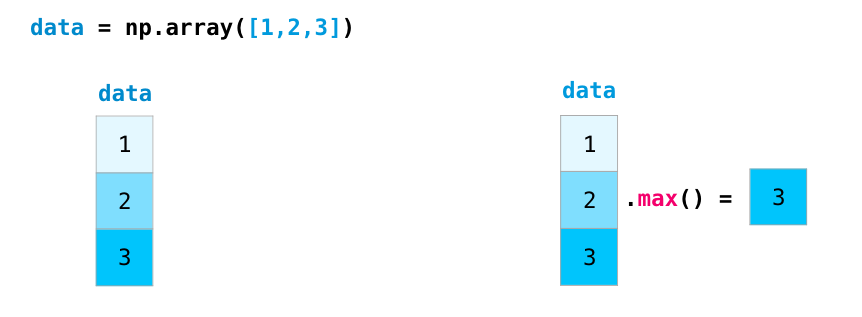
The NumPy package is the workhorse of data analysis, machine learning, and scientific computing in the python ecosystem. It vastly simplifies manipulating and crunching vectors and matrices. Some of python’s leading package rely on NumPy as a fundamental piece of their infrastructure (examples include scikit-learn, SciPy, pandas, and tensorflow). Beyond the ability to slice and dice numeric data, mastering numpy will give you an edge when dealing and debugging with advanced usecases in these libraries.
NumPy 库是 Python 生态中数据分析、机器学习与科学计算的主力工具。它极大地简化了向量与矩阵的处理和运算。Python 众多主流库都将 NumPy 当作底层基础组件,典型例子包含 scikit‑learn、SciPy、pandas 以及 tensorflow。除了能够灵活拆分、处理数值数据之外,熟练掌握 NumPy,能够让你在处理、调试上述库当中的复杂业务场景时占得优势。
In this post, we’ll look at some of the main ways to use NumPy and how it can represent different types of data (tables, images, text…etc) before we can serve them to machine learning models.
在本篇文章中,我们将介绍 NumPy 的几种主要使用方式,以及在把各类数据(表格、图像、文本等)输送至机器学习模型前,它是如何对不同类型的数据进行表示的。
1 | import numpy as np |
Creating Arrays 创建数组
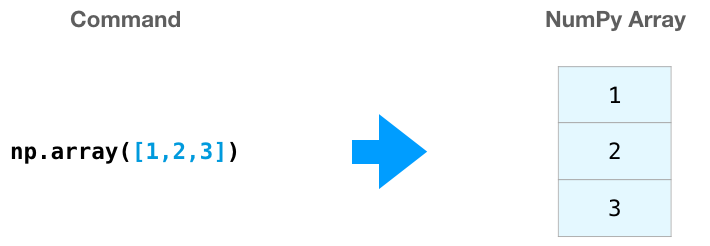
We can create a NumPy array (a.k.a. the mighty ndarray) by passing a python list to it and using np.array(). In this case, python creates the array we can see on the right here:
我们可以向 np.array() 传入 Python 列表,以此创建 NumPy 数组(也就是功能强大的 ndarray)。本例当中,Python 生成了右侧展示出来的数组:
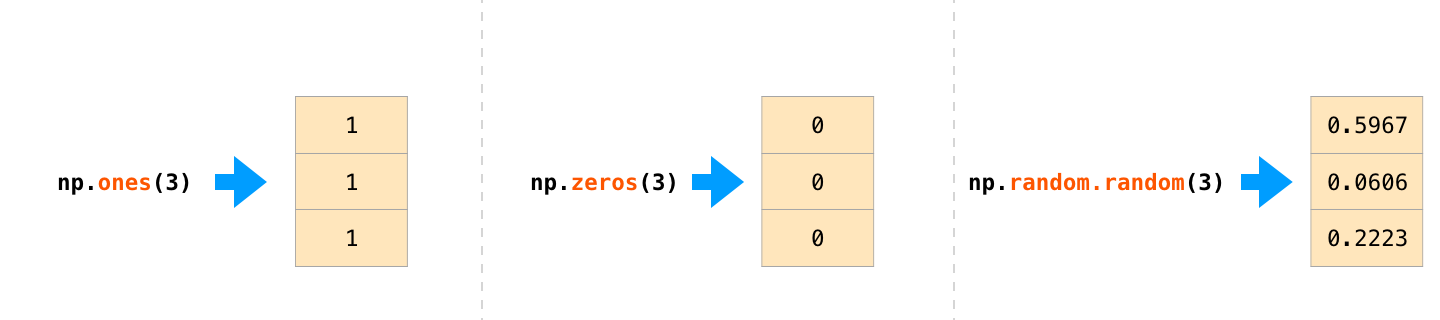
There are often cases when we want NumPy to initialize the values of the array for us. NumPy provides methods like ones(), zeros(), and random.random() for these cases. We just pass them the number of elements we want it to generate:
我们时常需要 NumPy 替我们初始化数组数值。针对这类需求,NumPy 提供了 ones()、zeros() 以及 random.random() 等函数方法。我们只需向其传入想要生成的元素数量即可:
Once we’ve created our arrays, we can start to manipulate them in interesting ways.
在创建好数组之后,我们便能够以各类实用的方式对其进行操作。
Array Arithmetic 数组运算
Let’s create two NumPy arrays to showcase their usefulness. We’ll call them data and ones:
接下来我们创建两个 NumPy 数组来演示其实用性,分别将它们命名为data和ones:

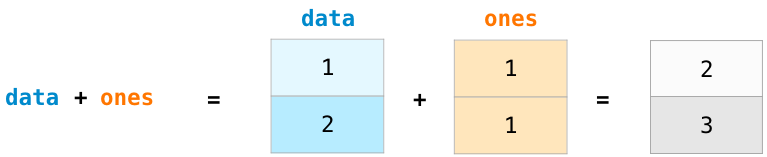
Adding them up position-wise (i.e. adding the values of each row) is as simple as typing data + ones:
按位置将二者相加(也就是对每一行的数值求和),只需输入data + ones即可完成操作:
When I started learning such tools, I found it refreshing that an abstraction like this makes me not have to program such a calculation in loops. It’s a wonderful abstraction that allows you to think about problems at a higher level.
当我开始学习这类工具时,我发觉这类抽象机制十分让人耳目一新,它让我无需通过循环编写计算程序。这是一种出色的抽象方式,可以让你站在更高的层面去思考问题。
And it’s not only addition that we can do this way:
而且不光加法可以这么运算:

There are often cases when we want to carry out an operation between an array and a single number (we can also call this an operation between a vector and a scalar). Say, for example, our array represents distance in miles, and we want to convert it to kilometers. We simply say data * 1.6:
我们时常需要在数组与单个数值之间执行运算(也可称作向量和标量之间的运算)。举个例子,数组存储着以英里为单位的距离数据,而我们需要将其换算成千米。只需编写代码 data * 1.6 即可:

See how NumPy understood that operation to mean that the multiplication should happen with each cell? That concept is called broadcasting, and it’s very useful.
你看到没,NumPy 将该运算解读为需要对每一个单元格执行相乘操作,该概念叫作 广播机制,它十分实用。
Indexing 索引
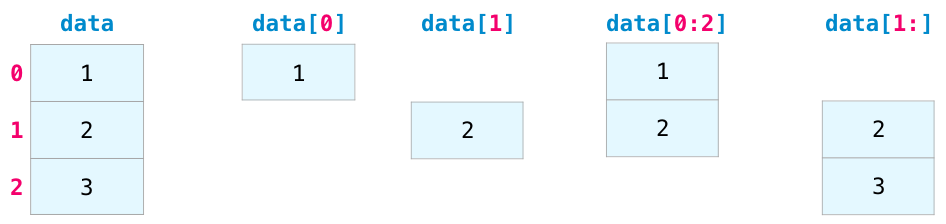
We can index and slice NumPy arrays in all the ways we can slice python lists:
我们可以像操作 Python 普通列表那样,对 NumPy 数组执行索引与切片操作。
Aggregation 聚合
Additional benefits NumPy gives us are aggregation functions:
NumPy 还给我们提供的另一类优势是聚合函数:

In addition to min, max, and sum, you get all the greats like mean to get the average, prod to get the result of multiplying all the elements together, std to get standard deviation, and plenty of others.
除 min、max、sum 以外,你还能使用各类实用函数:mean 求取平均值、prod 计算所有元素的乘积、std 计算标准差,此外还有很多别的函数。
In more dimensions 往更高维度
All the examples we’ve looked at deal with vectors in one dimension. A key part of the beauty of NumPy is its ability to apply everything we’ve looked at so far to any number of dimensions.
我们此前研究的所有示例都是一维向量。NumPy 一大亮眼优势,就是能够把前面学到的全部操作适配至任意维度。
Creating Matrices 创建矩阵
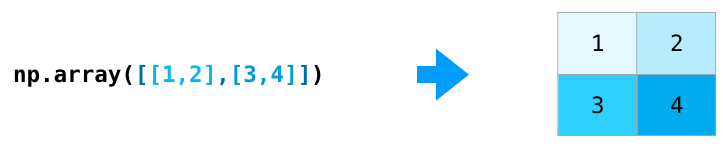
We can pass python lists of lists in the following shape to have NumPy create a matrix to represent them:
你可以传入如下格式的 Python 嵌套列表,让 NumPy 根据它生成矩阵。
1 | np.array([[1,2],[3,4]]) |
We can also use the same methods we mentioned above (ones(), zeros(), and random.random()) as long as we give them a tuple describing the dimensions of the matrix we are creating:
我们同样可以使用上文提到过的方法(ones()、zeros()、random.random());前提是向这些函数传入一个元组,用来规定待创建矩阵的维度。

Matrix Arithmetic 矩阵运算
We can add and multiply matrices using arithmetic operators (+-*/) if the two matrices are the same size. NumPy handles those as position-wise operations:
只有两个矩阵维度(行列数)完全一致时,才能够直接使用算术运算符 +-*/ 做运算;
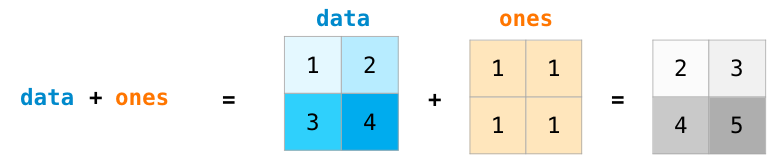
We can get away with doing these arithmetic operations on matrices of different size only if the different dimension is one (e.g. the matrix has only one column or one row), in which case NumPy uses its broadcast rules for that operation:
倘若两个数组所有维度基本一致,只是有一处维度的大小为 1(比如矩阵仅有一行或者一列),那就能够运算。这种情况下 NumPy 会依靠广播机制完成计算:

Dot Product 点积
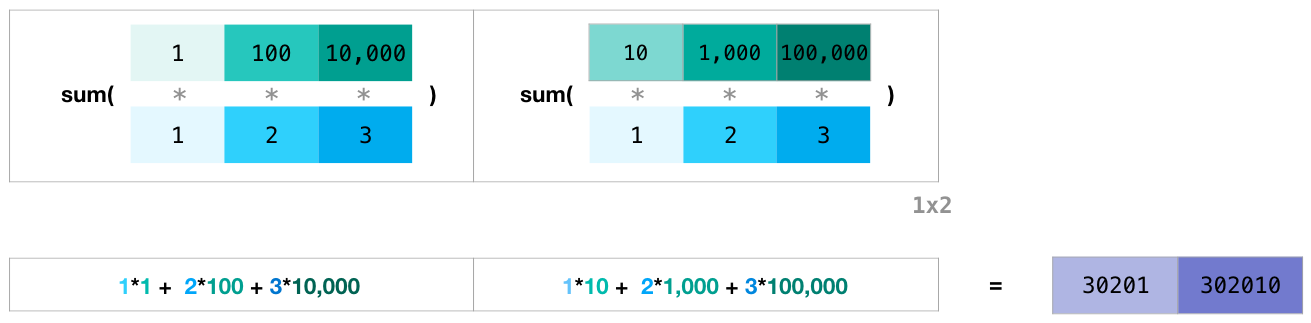
A key distinction to make with arithmetic is the case of matrix multiplication using the dot product. NumPy gives every matrix a dot() method we can use to carry-out dot product operations with other matrices:
普通数字相乘直接数值相乘,但矩阵乘法是点积运算;numpy 直接提供 dot() 函数实现矩阵点乘。
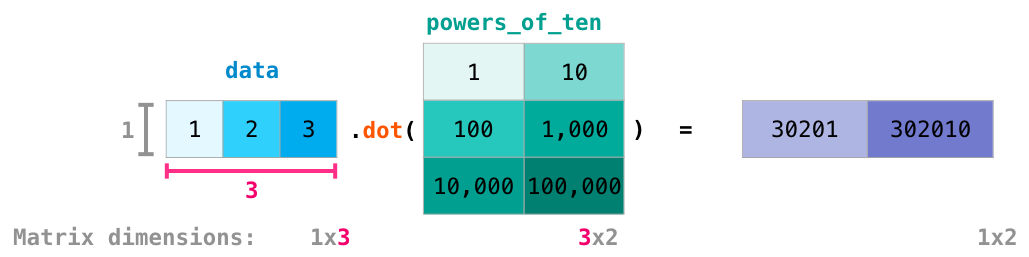
I’ve added matrix dimensions at the bottom of this figure to stress that the two matrices have to have the same dimension on the side they face each other with. You can visualize this operation as looking like this:
我已经在该图底部标注了矩阵尺寸,以此着重说明两个矩阵相接触的维度必须保持一致。你可以参照下面的示意图理解该运算:
Matrix Indexing 矩阵索引
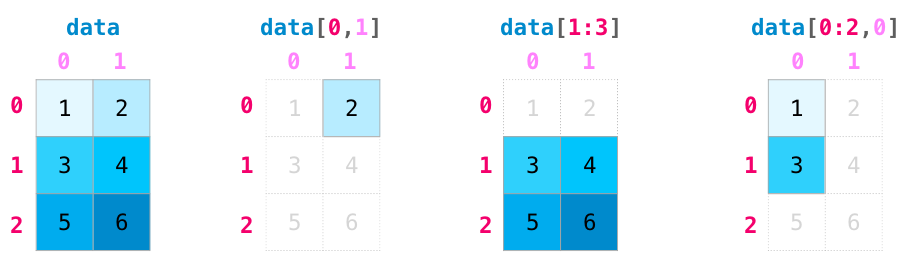
Indexing and slicing operations become even more useful when we’re manipulating matrices:
在处理矩阵时,索引和切片操作会变得更加实用:
Matrix Aggregation 矩阵聚合
We can aggregate matrices the same way we aggregated vectors:
我们可以像聚合向量那样聚合矩阵:

Not only can we aggregate all the values in a matrix, but we can also aggregate across the rows or columns by using the axis parameter:
我们不仅能够对矩阵全部数值做聚合运算,还可借助 axis 参数,单独按行或者按列进行聚合计算。

Transposing and Reshaping 转置与变形
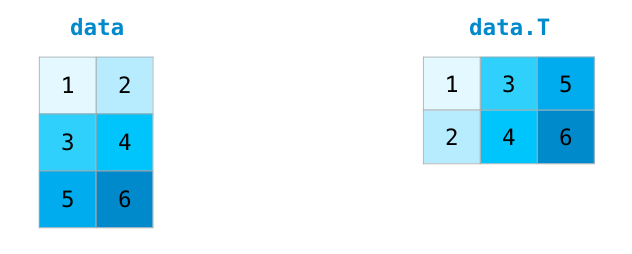
A common need when dealing with matrices is the need to rotate them. This is often the case when we need to take the dot product of two matrices and need to align the dimension they share. NumPy arrays have a convenient property called T to get the transpose of a matrix:
处理矩阵时经常需要做矩阵转置(旋转矩阵);最常见场景:计算两个矩阵点积,需要对齐二者匹配的维度。NumPy 数组自带属性 T,可以便捷获取矩阵的转置。
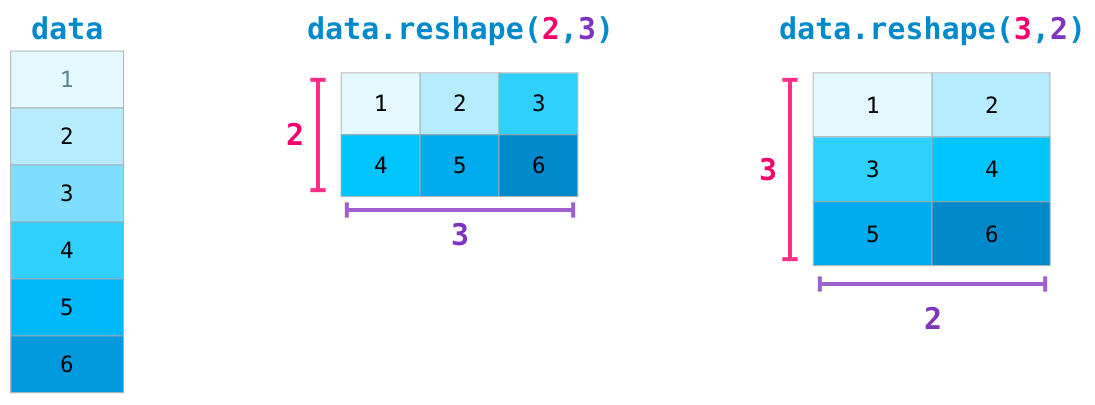
In more advanced use case, you may find yourself needing to switch the dimensions of a certain matrix. This is often the case in machine learning applications where a certain model expects a certain shape for the inputs that is different from your dataset. NumPy’s reshape() method is useful in these cases. You just pass it the new dimensions you want for the matrix. You can pass -1 for a dimension and NumPy can infer the correct dimension based on your matrix:
在一些复杂的开发场景,你常会需要更改矩阵的尺寸。机器学习里这种情况十分常见:模型规定了固定的输入形状,但你手上数据集的格式对不上。这时就可以用上 NumPy 的 reshape() 函数。你直接传入想要的新尺寸就行。某个维度懒得手动计算,直接填 -1,NumPy 就会自动算出合适的大小。
Yet More Dimensions 更多维度
NumPy can do everything we’ve mentioned in any number of dimensions. Its central data structure is called ndarray (N-Dimensional Array) for a reason.
NumPy 能够在任意维度下实现前面讲到的所有功能。它的核心数据结构名为 ndarray(多维数组),这个命名是有缘由的。
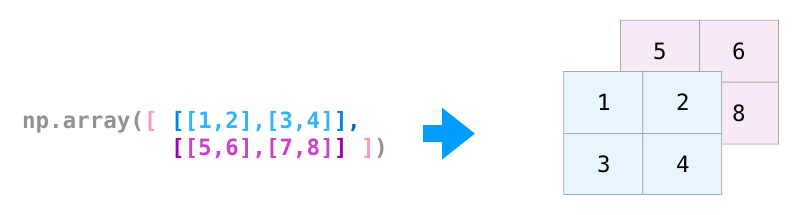
In a lot of ways, dealing with a new dimension is just adding a comma to the parameters of a NumPy function:
从很多层面来讲,处理新维度,不过就是给 NumPy 函数的参数多加一个逗号。
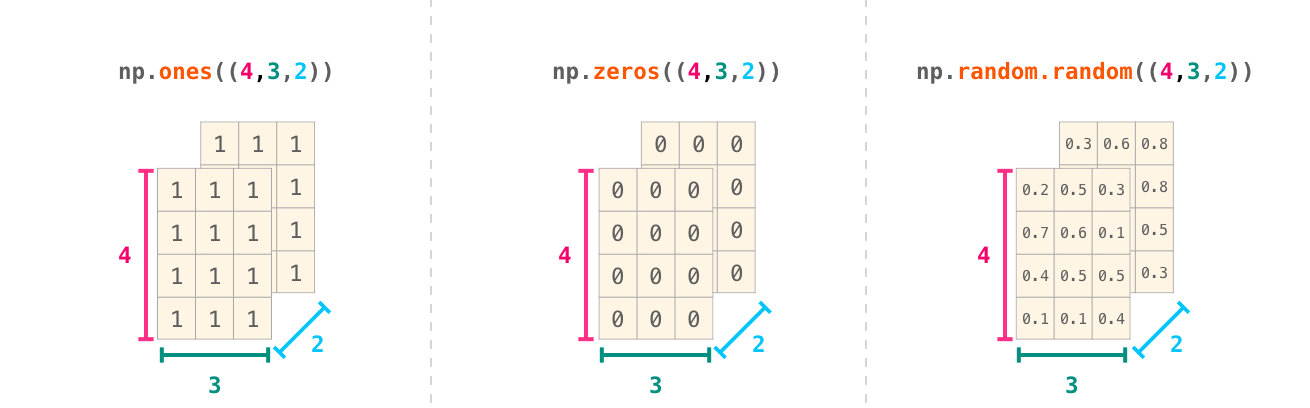
Note: Keep in mind that when you print a 3-dimensional NumPy array, the text output visualizes the array differently than shown here. NumPy’s order for printing n-dimensional arrays is that the last axis is looped over the fastest, while the first is the slowest. Which means that np.ones((4,3,2)) would be printed as:
注意:请记住,当你打印一个三维 NumPy 数组时,文本输出展示数组的形式和此处所示有所区别。NumPy 输出多维数组有固定顺序:最右边的维度最先循环读取,最左边的维度最后遍历、速度最慢。举个例子,np.ones((4,3,2)) 打印出来格式如下:
1 | array([[[1., 1.], |
Practical Usage 实际用法
And now for the payoff. Here are some examples of the useful things NumPy will help you through.
下面举一些实例,展示 NumPy 能够帮我们处理的实用任务
Formulas 公式
Implementing mathematical formulas that work on matrices and vectors is a key use case to consider NumPy for. It’s why NumPy is the darling of the scientific python community. For example, consider the mean square error formula that is central to supervised machine learning models tackling regression problems:
实现适用于矩阵与向量的数学公式运算,是选用 NumPy 的一项核心应用场景。这也是 NumPy 深受 Python 科研领域从业者青睐的原因。举个例子,均方误差公式对于处理回归任务的有监督机器学习模型至关重要:

Implementing this is a breeze in NumPy:
使用NumPy实现这一点十分简单:

The beauty of this is that numpy does not care if predictions and labels contain one or a thousand values (as long as they’re both the same size). We can walk through an example stepping sequentially through the four operations in that line of code:
NumPy 的便捷之处在于它不在乎 predictions 与 labels 里面是单个数值还是上千个数值,只要二者形状、长度一致即可正常运算。
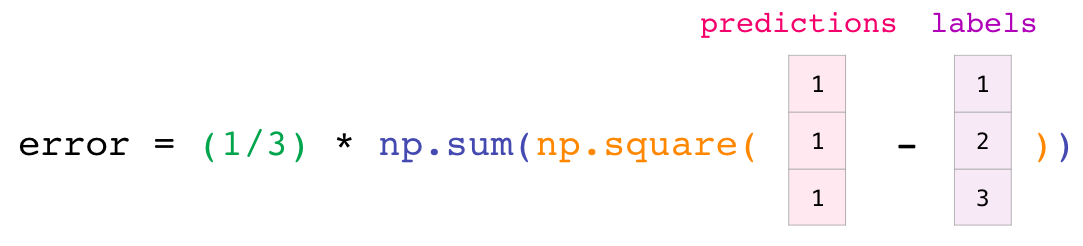
Both the predictions and labels vectors contain three values. Which means n has a value of three. After we carry out the subtraction, we end up with the values looking like this:
predictions 与 labels 均包含三个数值,也就是 n 的取值为 3。在完成减法运算之后,所得数值如下所示:

Then we can square the values in the vector:
接着我们便可对向量内的数值取平方:
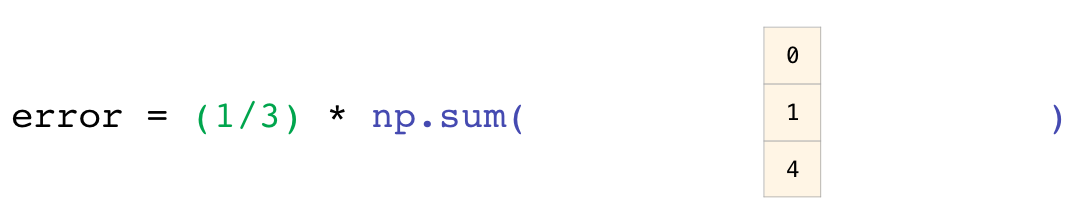
Now we sum these values:
接着我们便可对向量内的数值取平方:
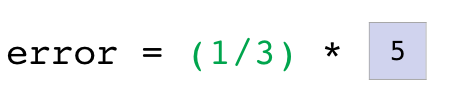
Which results in the error value for that prediction and a score for the quality of the model.
这会得出该次预测的误差值,以及一项用于评判模型优劣的得分。
Data Representation 数据表示
Think of all the data types you’ll need to crunch and build models around (spreadsheets, images, audio…etc). So many of them are perfectly suited for representation in an n-dimensional array:
试想所有你需要处理、用来搭建模型的数据类型(表格、图像、音频等等);其中绝大多数数据,都非常适合用 n 维数组进行存储表示。
Tables and Spreadsheets 表格与工作表
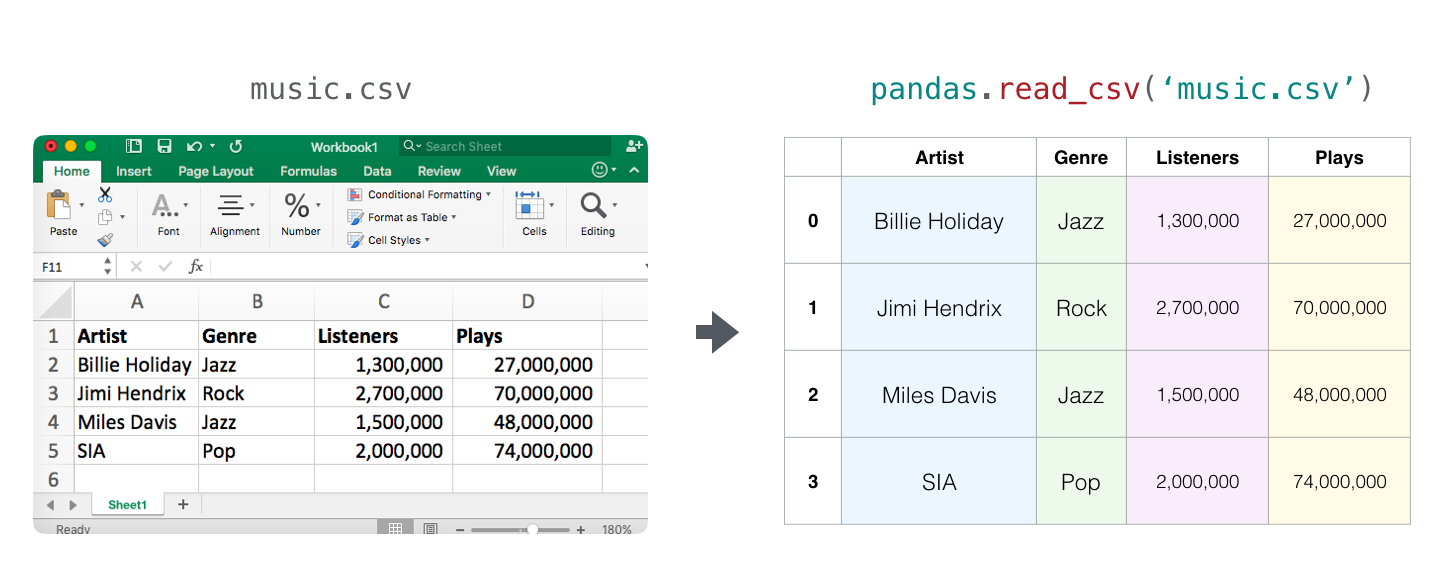
- A spreadsheet or a table of values is a two dimensional matrix. Each sheet in a spreadsheet can be its own variable. The most popular abstraction in python for those is the pandas dataframe, which actually uses NumPy and builds on top of it.
Excel 表格这种数值表单,本质就是二维矩阵。Excel 里每一张工作表,都能单独当成一份数据。Python 当中处理表格最常用的工具就是 Pandas 的 DataFrame,它底层就是 NumPy。
Audio and Timeseries 音频与时间序列
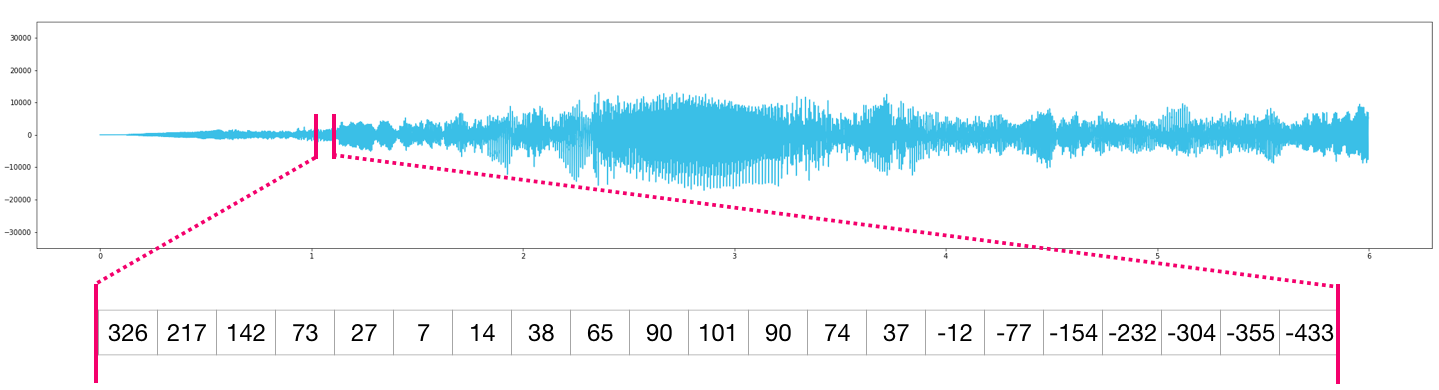
- An audio file is a one-dimensional array of samples. Each sample is a number representing a tiny chunk of the audio signal. CD-quality audio may have 44,100 samples per second and each sample is an integer between -32767 and 32768. Meaning if you have a ten-seconds WAVE file of CD-quality, you can load it in a NumPy array with length 10 * 44,100 = 441,000 samples. Want to extract the first second of audio? simply load the file into a NumPy array that we’ll call
audio, and getaudio[:44100].
音频文件本质就是一维的采样点数组。每一个采样数值,代表一小段声音信号。标准 CD 音质的音频,每秒采集 44100 个采样点,单个采样取值范围在 -32767~32768 的整数。举个例子,一段 10 秒 CD 音质的 WAV 音频,导入 NumPy 数组之后,一共有 10 × 44100 = 441000 个采样。如果只想截取最开始一秒的音频:把音频读进名叫 audio 的 NumPy 数组,截取 audio[:44100] 就完事。
Here’s a look at a slice of an audio file:
下面是一段音频文件片段的展示:
The same goes for time-series data (for example, the price of a stock over time).
时间序列数据亦是如此(例如某只股票随时间变化的价格)。
Images 图片
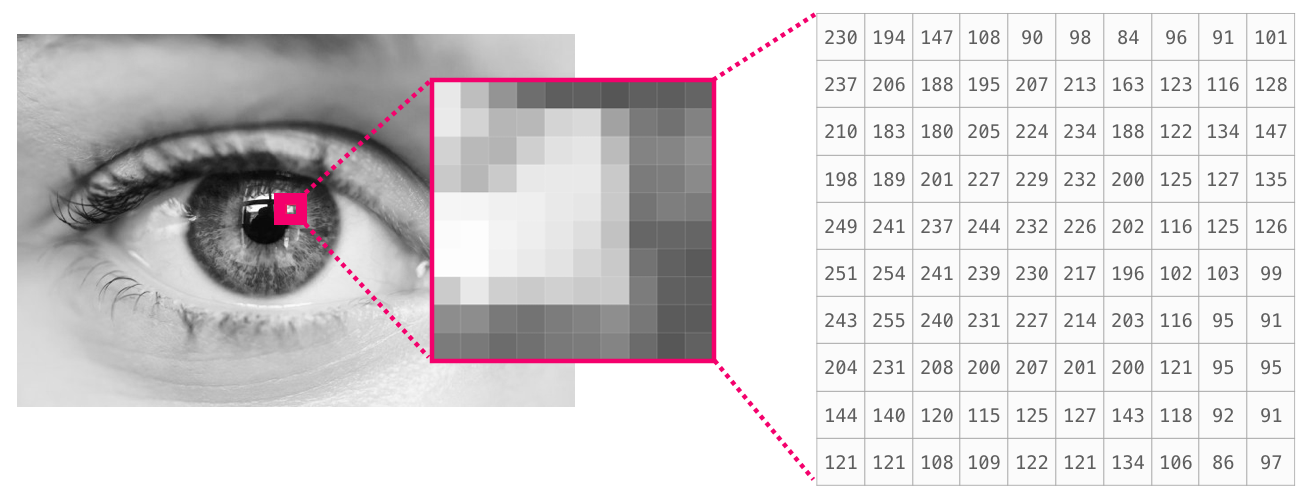
An image is a matrix of pixels of size (height x width).
一张图像是尺寸为(高度 × 宽度)的像素矩阵。- If the image is black and white (a.k.a. grayscale), each pixel can be represented by a single number (commonly between 0 (black) and 255 (white)). Want to crop the top left 10 x 10 pixel part of the image? Just tell NumPy to get you
image[:10,:10].
倘若图片为黑白图像(也叫灰度图像),每个像素可由单个数值表示(数值通常处于 0(黑色)255(白色)区间)。想要裁剪出图片左上角 10×10 像素的区域?只需调用 NumPy 执行image[:10,:10]即可。
- If the image is black and white (a.k.a. grayscale), each pixel can be represented by a single number (commonly between 0 (black) and 255 (white)). Want to crop the top left 10 x 10 pixel part of the image? Just tell NumPy to get you
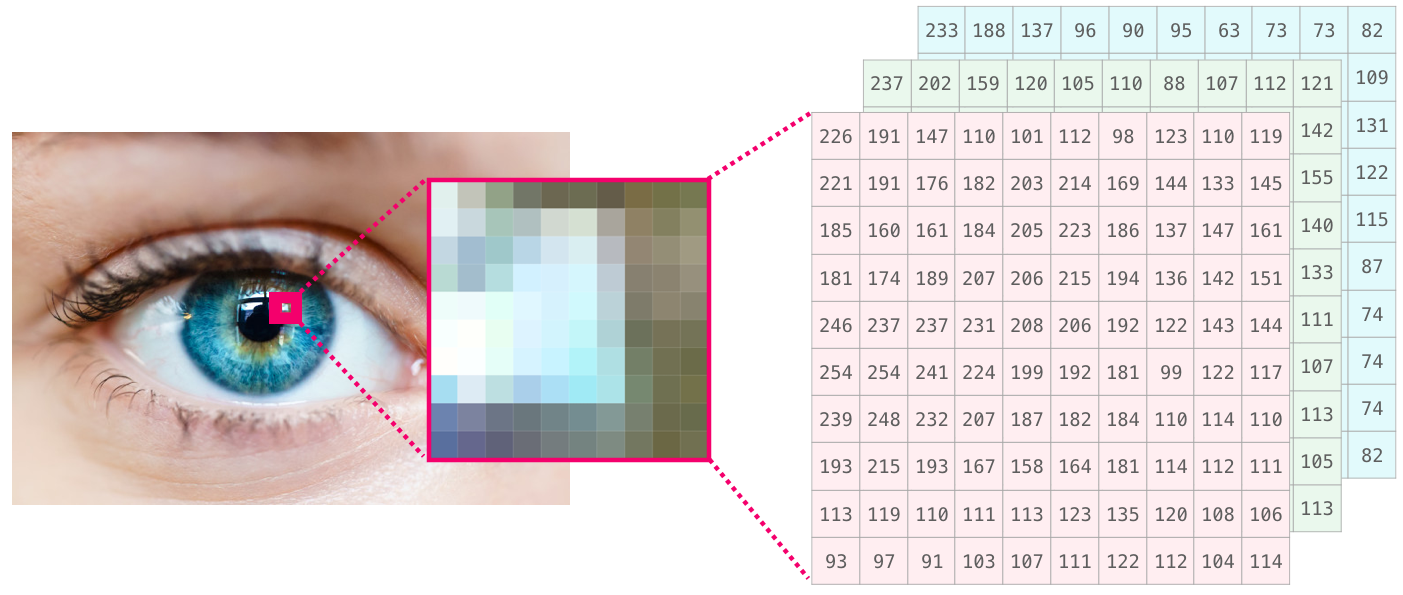
Here’s a look at a slice of an image file:
下面展示一张图像文件的部分内容:
- If the image is colored, then each pixel is represented by three numbers - a value for each of red, green, and blue. In that case we need a 3rd dimension (because each cell can only contain one number). So a colored image is represented by an ndarray of dimensions: (height x width x 3).
如果是彩色图片,那每一个像素点都由三个数值组成,分别对应红、绿、蓝三种颜色。因为数组一个位置只能存放一个数字,所以这时就多出第三维。因此彩色图片的 numpy 数组格式就是:(图片高度 × 图片宽度 × 3)
Language
If we’re dealing with text, the story is a little different. The numeric representation of text requires a step of building a vocabulary (an inventory of all the unique words the model knows) and an embedding step. Let us see the steps of numerically representing this (translated) quote by an ancient spirit:
但要是我们处理的是文本,那就不一样了。想把文字变成机器看得懂的数字,先要制作词汇表(也就是整理好模型认识的所有不重复词语),之后再做词嵌入。下面咱们就演示一遍,如何把这句古人名言转换成数字。
“Have the bards who preceded me left any theme unsung?”
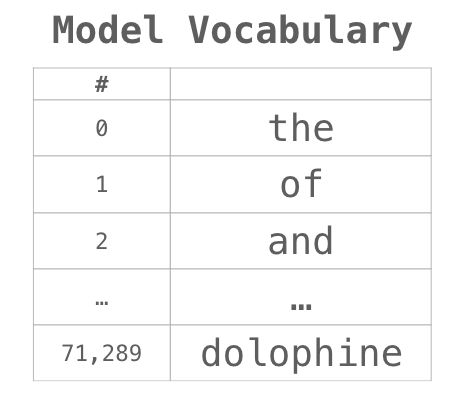
A model needs to look at a large amount of text before it can numerically represent the anxious words of this warrior poet. We can proceed to have it process a small dataset and use it to build a vocabulary (of 71,290 words):
模型得先看过海量文本,才能够用数字去读懂这位悲壮诗人笔下饱含心绪的文字。接下来我们让模型读取一份小型数据集,靠它生成一份内含 71290 个词语的词汇表。
The sentence can then be broken into an array of tokens (words or parts of words based on common rules):
之后这句话能够拆分出一组 token(按照通用规则拆分出来的完整单词或是词语片段),存到数组里面。

We then replace each word by its id in the vocabulary table:
随后我们使用词汇表里面的编号替换每一个单词:

These ids still don’t provide much information value to a model. So before feeding a sequence of words to a model, the tokens/words need to be replaced with their embeddings (50 dimension word2vec embedding in this case):
这些单词编号本身,对模型来说没多少有用信息。所以在把词语序列输入模型之前,token 需要转换成词向量;本例用的是 50 维的 word2vec embedding。

You can see that this NumPy array has the dimensions [embedding_dimension x sequence_length]. In practice these would be the other way around, but I’m presenting it this way for visual consistency. For performance reasons, deep learning models tend to preserve the first dimension for batch size (because the model can be trained faster if multiple examples are trained in parallel). This is a clear case where reshape() becomes super useful. A model like BERT, for example, would expect its inputs in the shape: [batch_size, sequence_length, embedding_size].
你能看见这个 NumPy 数组的尺寸是「词向量维度 × 文本单词长度」。
实际开发里二者顺序一般是反过来的,我现在这样写只是为了看着顺眼、方便理解。出于运行速度考量,深度学习模型习惯把第一个维度留给批次大小(一次性同时训练多条样本,训练速度会快很多)。这种场景就非常适合使用 reshape() 修改数组形状。举个例子,BERT 模型要求输入数据格式为:[一批多少条样本,一条文本有多少个词,单个词语向量维度大小]
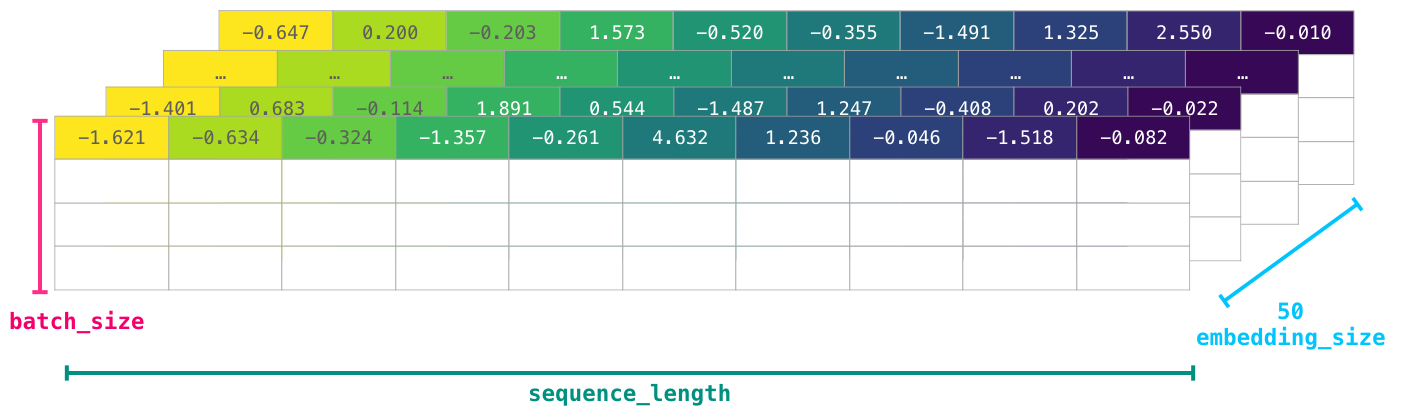
This is now a numeric volume that a model can crunch and do useful things with. I left the other rows empty, but they’d be filled with other examples for the model to train on (or predict).
现在这组纯数字的数据,模型就能够运算处理、拿来干活了。表格剩下的行我这里是空着的,实际里面会填上其余样本,供给模型用来训练或是做预测。
(It turned out the poet’s words in our example were immortalized more so than those of the other poets which trigger his anxieties. Born a slave owned by his father, Antarah’s valor and command of language gained him his freedom and the mythical status of having his poem as one of seven poems suspended in the kaaba in pre-Islamic Arabia).
事实证明,咱们例子里这位诗人写下的字句流传千古,名气远超其他令他心生顾虑的诗人。安塔拉生来便是父亲名下的奴隶;他骁勇善战、文笔出众,因此重获自由。在伊斯兰教诞生之前的阿拉伯地区,传说他的诗作是七幅悬挂于克尔白圣殿的名诗之一。