【翻译】【Pi Agent】打造有主见的极简coding agent的经验总结
借助 AI 翻译自What I learned building an opinionated and minimal coding agent,以供学习 Pi agent 的基本理念。
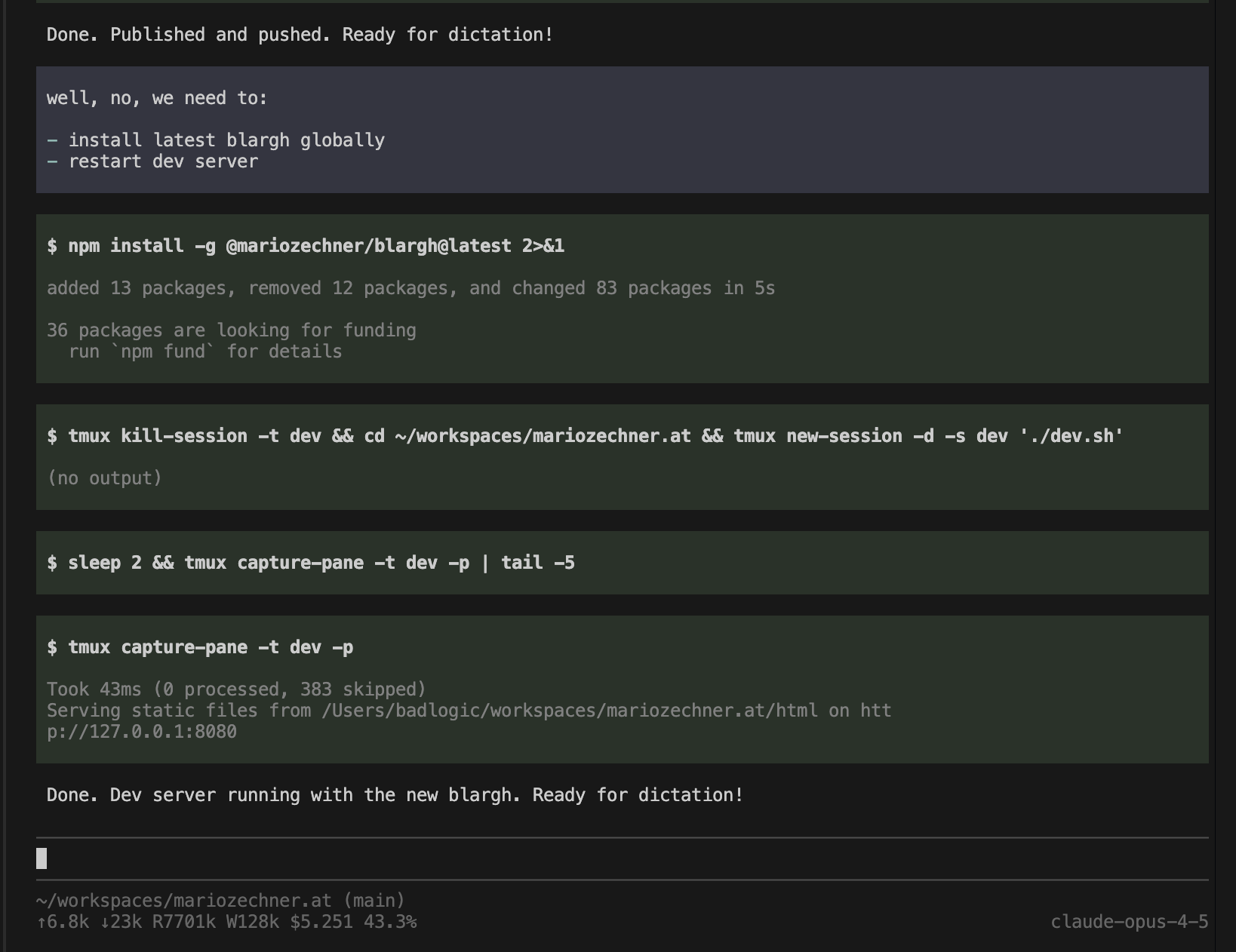
In the past three years, I’ve been using LLMs for assisted coding. If you read this, you probably went through the same evolution: from copying and pasting code into ChatGPT, to Copilot auto-completions (which never worked for me), to Cursor, and finally the new breed of coding agent harnesses like Claude Code, Codex, Amp, Droid, and opencode that became our daily drivers in 2025.
过去三年里,我一直在使用 LLM 进行辅助编程。如果你读到这里,或许也经历过同样的发展历程:从把代码复制粘贴到 ChatGPT,再到 Copilot 的自动补全功能(我用着效果一直不好),之后使用 Cursor,最后是新一代 coding agent harnesses,例如 Claude Code、Codex、Amp、Droid 以及 opencode,这些工具在 2025 年已经成为我们日常工作的主力。
I preferred Claude Code for most of my work. It was the first thing I tried back in April after using Cursor for a year and a half. Back then, it was much more basic. That fit my workflow perfectly, because I’m a simple boy who likes simple, predictable tools. Over the past few months, Claude Code has turned into a spaceship with 80% of functionality I have no use for. The system prompt and tools also change on every release, which breaks my workflows and changes model behavior. I hate that. Also, it flickers.
我的大部分工作更偏爱使用 Claude Code。在使用 Cursor 一年半之后,我于四月份首次尝试了它。那时候,它的功能还简陋得多。这与我的 workflow 十分契合,因为我是个追求简单的人,喜欢简单、结果可预期的工具。过去这几个月里,Claude Code 变得如同一艘大型飞船,其中 80% 的功能我都用不上。而且每次版本更新,系统提示词和可用工具都会发生变动,打乱我的工作流程,同时改变模型的输出表现。我很反感这点。此外,该工具还会出现界面闪烁的问题。
I’ve also built a bunch of agents over the years, of various complexity. For example, Sitegeist, my little browser-use agent, is essentially a coding agent that lives inside the browser. In all that work, I learned that context engineering is paramount. Exactly controlling what goes into the model’s context yields better outputs, especially when it’s writing code. Existing harnesses make this extremely hard or impossible by injecting stuff behind your back that isn’t even surfaced in the UI.
这些年我也开发过大量不同复杂度的 agent。举个例子,我开发的简易浏览器操作 agent Sitegeist,本质上是一个运行在浏览器内部的 coding agent。在这些工作过程中,我认识到上下文工程至关重要。精准控制送入模型上下文的内容,能够获得质量更高的输出,在代码生成场景下尤为明显。现有的 harness 框架会在后台悄悄注入各类内容,且这些内容甚至不会在用户界面展示,这让精准控制上下文变得十分困难,甚至完全无法实现。
Speaking of surfacing things, I want to inspect every aspect of my interactions with the model. Basically no harness allows that. I also want a cleanly documented session format I can post-process automatically, and a simple way to build alternative UIs on top of the agent core. While some of this is possible with existing harnesses, the APIs smell like organic evolution. These solutions accumulated baggage along the way, which shows in the developer experience. I’m not blaming anyone for this. If tons of people use your shit and you need some sort of backwards compatibility, that’s the price you pay.
说到把底层细节暴露出来这件事,我希望能够完整检视我和大模型交互的全部细节,但几乎没有 harness 框架能做到这点。我还想要一套文档完善的会话数据格式,方便我做后续自动化处理,同时希望能有一种简单的方式,在 agent core 之上搭建各类自定义用户界面。现有部分 harness 框架虽可以实现其中部分功能,但它们的 api 给人的感觉是自然演化出来的(不是从头精心设计)。这类方案在发展过程中堆积了大量历史遗留问题,直接体现在糟糕的开发者使用体验上。我并非在指责任何人。如果大量用户在使用你的产品,同时你还需要保障一定程度的向后兼容性,这就是所要付出的代价。
I’ve also dabbled in self-hosting, both locally and on DataCrunch. While some harnesses like opencode support self-hosted models, it usually doesn’t work well. Mostly because they rely on libraries like the Vercel AI SDK, which doesn’t play nice with self-hosted models for some reason, specifically when it comes to tool calling.
我也尝试过自托管部署,包括本地部署以及在 DataCrunch 平台上部署。虽然像 opencode 这类 harness 框架支持自托管模型,但实际使用效果往往不佳。主要原因是它们依赖 Vercel AI SDK 这类库,不知为何,该库与自托管模型兼容性较差,在工具调用场景下问题尤为突出。
So what’s an old guy yelling at Claudes going to do? He’s going to write his own coding agent harness and give it a name that’s entirely un-Google-able, so there will never be any users. Which means there will also never be any issues on the GitHub issue tracker. How hard can it be?
那么一个对Claude愤愤不满的老家伙能做些什么呢?他会自己编写一套coding agent harness框架,还给它取一个完全搜不到的名字,这样就不会有任何用户,也就永远不会有 GitHub issue。这能有多难呢?
To make this work, I needed to build:
为此,我需要做:
- pi-ai: A unified LLM API with multi-provider support (Anthropic, OpenAI, Google, xAI, Groq, Cerebras, OpenRouter, and any OpenAI-compatible endpoint), streaming, tool calling with TypeBox schemas, thinking/reasoning support, seamless cross-provider context handoffs, and token and cost tracking.
pi‑ai:一款统一的大语言模型应用程序接口,支持多家服务商(Anthropic、OpenAI、Google、xAI、Groq、Cerebras、OpenRouter,以及所有兼容 OpenAI 的接口),具备流式输出、基于 TypeBox 模式的工具调用、thinking/reasoning 能力支持、跨服务商无缝上下文交接,以及 token 与成本追踪功能。
pi-agent-core: An agent loop that handles tool execution, validation, and event streaming.
pi‑agent‑core:负责工具执行、结果校验以及事件流处理的 agent loop。
pi-tui: A minimal terminal UI framework with differential rendering, synchronized output for (almost) flicker-free updates, and components like editors with autocomplete and markdown rendering.
pi‑tui:一款轻量终端 UI 框架,具备差分渲染(differential rendering)、同步输出能力,可实现近乎无闪烁的界面更新,以及带自动补全和 markdown 渲染的编辑器等组件。
pi-coding-agent: The actual CLI that wires it all together with session management, custom tools, themes, and project context files.
- pi‑coding‑agent:实际的 cli,将会话管理、自定义工具、主题以及项目上下文文件全部整合到一起。
My philosophy in all of this was: if I don’t need it, it won’t be built. And I don’t need a lot of things.
我对此的一贯理念是:如果我不需要它,就不会去打造它。而我不需要的东西有很多。
pi-ai and pi-agent-core
I’m not going to bore you with the API specifics of this package. You can read it all in the README.md. Instead, I want to document the problems I ran into while creating a unified LLM API and how I resolved them. I’m not claiming my solutions are the best, but they’ve been working pretty well throughout various agentic and non-agentic LLM projects.
我不会用这个软件包的 API 细节来烦你,这些内容你都可以在 README.md 文件中查阅。相反,我想要记录下我在搭建统一 LLM API 时遇到的各类问题,以及我是如何解决这些问题的。我并不认为我的解决方案是最优的,但它们在各类agentic 和 non-agentic LLM 项目中都运行得相当不错。
There. Are. Four. Ligh… APIs
There’s really only four APIs you need to speak to talk to pretty much any LLM provider: OpenAI’s Completions API, their newer Responses API, Anthropic’s Messages API, and Google’s Generative AI API.
实际上,想要对接几乎所有大模型服务商,你只需要用到 4 套 API:OpenAI 的 Completions API、它新出的 Responses API、Anthropic 的 Messages API,以及谷歌的 Generative AI API。
They’re all pretty similar in features, so building an abstraction on top of them isn’t rocket science. There are, of course, provider-specific peculiarities you have to care for. That’s especially true for the Completions API, which is spoken by pretty much all providers, but each of them has a different understanding of what this API should do. For example, while OpenAI doesn’t support reasoning traces in their Completions API, other providers do in their version of the Completions API. This is also true for inference engines like llama.cpp, Ollama, vLLM, and LM Studio.
它们的功能都十分相近,因此在其之上构建一层抽象层并非什么难事。当然,你需要处理各服务商独有的特殊细节。Completions API 的情况尤其如此,几乎所有服务商都提供该接口,但每家服务商对该接口的功能定义却各有不同。举例来说,OpenAI 的 Completions API 不支持 reasoning traces,而其他部分服务商的 Completions API 版本则支持该功能。llama.cpp、Ollama、vLLM 以及 LM Studio 这类推理引擎也存在同样的情况。
For example, in openai-completions.ts:
举个例子,在 openai-completions.ts 里:
- Cerebras, xAI, Mistral, and Chutes don’t like the
storefield Cerebras、xAI、Mistral 以及 Chutes 不支持 store 字段
Mistral and Chutes use
max_tokensinstead ofmax_completion_tokensMistral 和 Chutes 使用 max_tokens,而非 max_completion_tokens
Cerebras, xAI, Mistral, and Chutes don’t support the
developerrole for system promptsCerebras、xAI、Mistral 以及 Chutes 不支持在 system prompts 里面使用的 developer role
Grok models don’t like
reasoning_effortGrok模型不支持reasoning_effort参数
Different providers return reasoning content in different fields (
reasoning_contentvsreasoning)- 不同服务商返回 reasoning 内容的时候,使用的字段不一样,有的用 reasoning_content,有的用 reasoning。
To ensure all features actually work across the gazillion of providers, pi-ai has a pretty extensive test suite covering image inputs, reasoning traces, tool calling, and other features you’d expect from an LLM API. Tests run across all supported providers and popular models. While this is a good effort, it still won’t guarantee that new models and providers will just work out of the box.
为确保海量服务商下所有功能都能正常运行,pi‑ai 配备了一套相当完备的 test suite,覆盖图像输入、reasoning traces、tool calling 以及 LLM API 应具备的其他各类功能。测试会在全部受支持的服务商与主流模型上执行。尽管已经做了大量工作,但仍无法保证新接入的模型和服务商能够开箱即用。
Another big difference is how providers report tokens and cache reads/writes. Anthropic has the sanest approach, but generally it’s the Wild West. Some report token counts at the start of the SSE stream, others only at the end, making accurate cost tracking impossible if a request is aborted. To add insult to injury, you can’t provide a unique ID to later correlate with their billing APIs and figure out which of your users consumed how many tokens. So pi-ai does token and cache tracking on a best-effort basis. Good enough for personal use, but not for accurate billing if you have end users consuming tokens through your service.
另一个重大差异在于各家服务商统计 token、缓存读写的方式。Anthropic 的方案相对合理,但整个行业基本处于混乱无序的状态。有些服务商在 SSE 流式传输一开始就返回 token 计数,另一些只在流结束后才上报。这就导致:如果请求中途被中断,就无法精准统计开销。更麻烦的是:你无法传入自定义唯一 ID,后续也就无法和计费 API 做关联,,也就没法分清究竟是哪个用户消耗了多少 token。因此 pi‑ai 只能尽最大努力做 token 与缓存用量统计。个人使用尚可,但如果你的终端用户通过你的服务调用模型,这套机制就做不到精准计费。
Special shout out to Google who to this date seem to not support tool call streaming which is extremely Google.
特别吐槽下谷歌,直到现在它似乎还不支持 tool call 流式输出,这事儿简直太符合谷歌一贯作风了。
pi-ai also works in the browser, which is useful for building web-based interfaces. Some providers make this especially easy by supporting CORS, specifically Anthropic and xAI.
pi‑ai 同样可在浏览器中运行,这对于开发网页端界面十分实用。部分服务提供商通过支持跨域资源共享(CORS)让该过程变得格外简单,其中就包括 Anthropic 和 xAI。
Context handoff
Context handoff between providers was a feature pi-ai was designed for from the start. Since each provider has their own way of tracking tool calls and thinking traces, this can only be a best-effort thing. For example, if you switch from Anthropic to OpenAI mid-session, Anthropic thinking traces are converted to content blocks inside assistant messages, delimited by <thinking></thinking> tags. This may or may not be sensible, because the thinking traces returned by Anthropic and OpenAI don’t actually represent what’s happening behind the scenes.
服务商之间的 handoff 是 pi‑ai 从最初设计就具备的一项功能。由于每个服务商都有各自追踪 tool call 与 thinking traces 的方式,该功能只能做到尽力支持。例如,如果你在会话中途从 Anthropic 切换至 OpenAI,Anthropic 的 thinking traces 会被转换为 assistant 消息内的内容块,以 <thinking></thinking > 标签作为分隔。这种处理方式未必合理,因为 Anthropic 和 OpenAI 返回的 thinking traces 实际上并不代表模型后台真实发生的过程。
These providers also insert signed blobs into the event stream that you have to replay on subsequent requests containing the same messages. This also applies when switching models within a provider. It makes for a cumbersome abstraction and transformation pipeline in the background.
这些服务商还会在 event stream 里插入签名二进制块(blob)。当你后续再发请求,并且该请求带上了一模一样的对话消息时(比如多轮对话续聊,或者换同厂商另一个模型,但复用相同对话上下文),你必须把这些签名块原样重放回去。就算只是在同一个服务商底下切换不同模型,也需要这么做。这让后台的抽象层和数据转换链路变得非常麻烦。
I’m happy to report that cross-provider context handoff and context serialization/deserialization work pretty well in pi-ai:
我很高兴向大家汇报,在 pi‑ai 中,跨服务商 handoff 以及上下文序列化 / 反序列化功能运行效果相当不错:
1 | import { getModel, complete, Context } from '@mariozechner/pi-ai'; |
We live in a multi-model world
Speaking of models, I wanted a typesafe way of specifying them in the getModel call. For that I needed a model registry that I could turn into TypeScript types. I’m parsing data from both OpenRouter and models.dev (created by the opencode folks, thanks for that, it’s super useful) into models.generated.ts. This includes token costs and capabilities like image inputs and thinking support.
说到模型,我希望能在调用 getModel 时以类型安全的方式指定模型。为此我需要一个模型注册表,并且可以将其转换为 TypeScript 类型。我正在解析来自 OpenRouter 以及 models.dev(由 opencode 团队开发,感谢他们,这个工具非常实用)的数据,生成 models.generated.ts 文件。解析内容包含 token 成本,以及图像输入、思考能力支持这类功能特性。
And if I ever need to add a model that’s not in the registry, I wanted a type system that makes it easy to create new ones. This is especially useful when working with self-hosted models, new releases that aren’t yet on models.dev or OpenRouter, or trying out one of the more obscure LLM providers:
如果我后续需要添加一个不在注册表中的模型,我希望有一套类型系统,能够方便地创建新模型。这在使用自托管模型、尚未发布到 models.dev 或 OpenRouter 的新版本,或是尝试某些较为小众的 LLM 服务商时格外实用:
1 | import { Model, stream } from '@mariozechner/pi-ai'; |
Many unified LLM APIs completely ignore providing a way to abort requests. This is entirely unacceptable if you want to integrate your LLM into any kind of production system. Many unified LLM APIs also don’t return partial results to you, which is kind of ridiculous. pi-ai was designed from the beginning to support aborts throughout the entire pipeline, including tool calls. Here’s how it works:
许多统一 LLM API 完全没有提供终止请求的功能。如果你要将大模型集成到任意生产系统中,这是完全无法接受的。不少统一 LLM API 还不会向你返回中间结果,这多少有些离谱。pi‑ai 从设计之初就在整个处理链路(包括 tool call)中支持终止请求。具体实现逻辑如下:
1 | import { getModel, stream } from '@mariozechner/pi-ai'; |
Structured split tool results
Another abstraction I haven’t seen in any unified LLM API is splitting tool results into a portion handed to the LLM and a portion for UI display. The LLM portion is generally just text or JSON, which doesn’t necessarily contain all the information you’d want to show in a UI. It also sucks hard to parse textual tool outputs and restructure them for display in a UI. pi-ai’s tool implementation allows returning both content blocks for the LLM and separate content blocks for UI rendering. Tools can also return attachments like images that get attached in the native format of the respective provider. Tool arguments are automatically validated using TypeBox schemas and AJV, with detailed error messages when validation fails:
在各类统一 LLM API 中,我还未曾见到过另一类抽象设计:将工具调用结果拆分为提供给 LLM 的部分,以及用于界面展示的部分。给到 LLM 的那部分结果通常仅为 TEXT 或 JSON 格式,未必包含你希望在用户界面上呈现的全部信息。而从工具输出的文本里再去解析并重新整理成 UI 需要的数据,体验会非常糟。pi‑ai 的 tool 实现方案支持同时返回供 LLM 使用的内容块,以及独立的用于界面渲染的内容块。tool 还可以返回图片这类附件,直接沿用该服务商原生格式附加到会话消息里。tool 参数会通过 TypeBox 模式与 AJV 自动校验,校验失败时会输出详细的错误信息:
1 | import { Type, AgentTool } from '@mariozechner/pi-ai'; |
What’s still lacking is tool result streaming. Imagine a bash tool where you want to display ANSI sequences as they come in. That’s currently not possible, but it’s a simple fix that will eventually make it into the package.
目前仍缺失的是 tool 结果流式输出功能。设想一个 bash 工具,你希望实时输出收到的 ANSI 转义序列。这一需求目前还无法实现,但属于简单的修复,最终会合并进这个软件包。
Partial JSON parsing during tool call streaming is essential for good UX. As the LLM streams tool call arguments, pi-ai progressively parses them so you can show partial results in the UI before the call completes. For example, you can display a diff streaming in as the agent rewrites a file.
tool call 流式输出过程中对 JSON 做部分解析,是良好用户体验的关键。当 LLM 输出 tool call 参数时,pi‑ai 会逐步解析这些片段,让你能在 tool call 完整结束前,就在界面上展示出部分结果。举个例子:agent 重写文件时,你可以流式实时渲染文件改动差异。
Minimal agent scaffold
Finally, pi-ai provides an agent loop that handles the full orchestration: processing user messages, executing tool calls, feeding results back to the LLM, and repeating until the model produces a response without tool calls. The loop also supports message queuing via a callback: after each turn, it asks for queued messages and injects them before the next assistant response. The loop emits events for everything, making it easy to build reactive UIs.
最后,pi‑ai 提供了一套 agent loop,负责完整流程编排:处理用户消息、执行 tool call、将结果反馈给 LLM,并循环往复,直至模型输出无需调用工具的回复。该 loop 还可通过回调函数实现消息队列机制:每轮执行完毕后,会获取队列中的消息,并将其插入到下一次 assistant 回复之前。loop 会为所有事件发出 event stream,便于开发响应式用户界面。
The agent loop doesn’t let you specify max steps or similar knobs you’d find in other unified LLM APIs. I never found a use case for that, so why add it? The loop just loops until the agent says it’s done. On top of the loop, however, pi-agent-core provides an Agent class with actually useful stuff: state management, simplified event subscriptions, message queuing with two modes (one-at-a-time or all-at-once), attachment handling (images, documents), and a transport abstraction that lets you run the agent either directly or through a proxy.
agent loop 不支持设置最大步数,也没有其他统一 LLM API 中常见的类似调节参数。我从未遇到过需要这类功能的使用场景,那又何必增加它呢?该 loop 会一直运行,直到 agent 判定任务完成。不过,在 loop 的基础之上,pi‑agent‑core 提供了一个实用性很强的 Agent class,具备状态管理、简化的事件订阅、两种模式(逐个处理或一次性处理)的消息队列、附件处理(图片、文档),以及传输抽象层,你可以选择直接运行 agent,或是通过代理来运行。
Am I happy with pi-ai? For the most part, yes. Like any unifying API, it can never be perfect due to leaky abstractions. But it’s been used in seven different production projects and has served me extremely well.
我对 pi‑ai 满意吗?大体上是满意的。和所有统一 api 一样,受限于抽象泄露问题(封装本应隐藏底层细节,但复杂场景下底层实现细节还是会暴露出来,造成 bug、边界问题,没有 API 能完全规避这个问题。),它永远无法做到尽善尽美。但它已经应用于七个不同的生产项目,为我提供了极大的帮助。
Why build this instead of using the Vercel AI SDK? Armin’s blog post mirrors my experience. Building on top of the provider SDKs directly gives me full control and lets me design the APIs exactly as I want, with a much smaller surface area. Armin’s blog gives you a more in-depth treatise on the reasons for building your own. Go read that.
为什么要自行开发这个,而不直接使用 Vercel AI SDK?Armin 的博客文章和我的亲身感受不谋而合。直接基于各服务商的 SDK 进行开发,能够让我拥有完全的控制权,可以按照自己的想法设计接口,同时代码涉及范围也小得多。Armin 的博客针对自研的原因做了更为深入的阐述,建议你去读一读。
pi-tui
I grew up in the DOS era, so terminal user interfaces are what I grew up with. From the fancy setup programs for Doom to Borland products, TUIs were with me until the end of the 90s. And boy was I fucking happy when I eventually switched to a GUI operating system. While TUIs are mostly portable and easily streamable, they also suck at information density. Having said all that, I thought starting with a terminal user interface for pi makes the most sense. I could strap on a GUI later whenever I felt like I needed to.
我成长于 DOS 时代,终端用户界面是我从小接触的东西。从《毁灭战士》华丽的安装程序到宝兰公司的各类产品,终端用户界面一直陪伴我到九十年代末。后来我切换到图形用户界面操作系统时,别提有多开心了。虽然终端用户界面大多具备良好的可移植性,也便于流式输出,但在信息密度方面表现很差。尽管如此,我认为为 Pi 项目先做终端用户界面是最合理的选择。之后只要我有需要,随时都可以再加上图形用户界面。
So why build my own TUI framework? I’ve looked into the alternatives like Ink, Blessed, OpenTUI, and so on. I’m sure they’re all fine in their own way, but I definitely don’t want to write my TUI like a React app. Blessed seems to be mostly unmaintained, and OpenTUI is explicitly not production ready. Also, writing my own TUI framework on top of Node.js seemed like a fun little challenge.
那为什么要自研 TUI 框架呢?我研究过 Ink、Blessed、OpenTUI 等其他同类方案。我相信这些方案各有可取之处,但我实在不想像写 React 应用那样来编写 TUI 程序。Blessed 基本已经不再维护,而 OpenTUI 明确说明不适合用于生产环境。此外,基于 Node.js 开发一套属于自己的 TUI 框架,对我来说也是个有趣的小挑战。
Two kinds of TUIs
Writing a terminal user interface is not rocket science per se. You just have to pick your poison. There’s basically two ways to do it. One is to take ownership of the terminal viewport (the portion of the terminal contents you can actually see) and treat it like a pixel buffer. Instead of pixels you have cells that contain characters with background color, foreground color, and styling like italic and bold. I call these full screen TUIs. Amp and opencode use this approach.
编写终端用户界面本身并非什么高深莫测的难事,只是你得做出取舍。大体上有两种实现方式。第一种是接管 terminal viewport(也就是终端中实际可见的内容区域),将其视作像素缓冲区(pixel buffer)。只不过这里没有像素,取而代之的是单元格(cells),单元格内包含字符,还带有背景色、前景色以及斜体、粗体这类样式。我把这类称为 full screen TUIs。Amp 和 opencode 就采用了该方案。
The drawback is that you lose the scrollback buffer, which means you have to implement custom search. You also lose scrolling, which means you have to simulate scrolling within the viewport yourself. While this is not hard to implement, it means you have to re-implement all the functionality your terminal emulator already provides. Mouse scrolling specifically always feels kind of off in such TUIs.
缺点是你会丢失 scrollback buffer,这意味着必须自行实现自定义搜索功能。同时也会失去滚动能力,需要你在 viewport 内手动模拟滚动效果。虽然实现起来并不困难,但这代表你需要重新实现终端模拟器(terminal emulator)原本已具备的全部功能。尤其是鼠标滚动,在这类 TUI 中体验总是多少有些别扭。
The second approach is to just write to the terminal like any CLI program, appending content to the scrollback buffer, only occasionally moving the “rendering cursor” back up a little within the visible viewport to redraw things like animated spinners or a text edit field. It’s not exactly that simple, but you get the idea. This is what Claude Code, Codex, and Droid do.
第二种方案就是像普通命令行程序(cli)一样直接向终端写入内容,将内容追加到 scrollback buffer,仅偶尔在 viewport 内把 “渲染光标”(rendering cursor)稍微向上移动,用来重绘动画加载指示器(animated spinners)或者文本编辑框(text edit)这类元素。实际实现并没有这么简单,但大致原理就是这样。Claude Code、Codex 和 Droid 采用的就是该方案。
Coding agents have this nice property that they’re basically a chat interface. The user writes a prompt, followed by replies from the agent and tool calls and their results. Everything is nicely linear, which lends itself well to working with the “native” terminal emulator. You get to use all the built-in functionality like natural scrolling and search within the scrollback buffer. It also limits what your TUI can do to some degree, which I find charming because constraints make for minimal programs that just do what they’re supposed to do without superfluous fluff. This is the direction I picked for pi-tui.
Coding agent 有一个很不错的特性:它们本质上就是聊天界面。用户输入提示词,之后便是 agent 的回复、tool call 以及调用结果。所有内容呈现清晰的线性顺序,这使其可以很好地适配 “原生”(native)终端模拟器。你可以使用各类内置功能,比如自然滚动,以及在 scrollback buffer 中检索内容。这也会在一定程度上限制 TUI 所能实现的功能,而我反倒觉得这一点很有吸引力,因为约束条件能够催生出极简程序 —— 这类程序只完成本职工作,没有多余冗余的功能。这正是我为 pi‑tui 选定的开发方向。
Retained mode UI
If you’ve done any GUI programming, you’ve probably heard of retained mode vs immediate mode. In a retained mode UI, you build up a tree of components that persist across frames. Each component knows how to render itself and can cache its output if nothing changed. In an immediate mode UI, you redraw everything from scratch each frame (though in practice, immediate mode UIs also do caching, otherwise they’d fall apart).
如果你做过任何图形用户界面编程,大概率听说过保留模式(retained mode)与即时模式(immediate mode)。在保留模式用户界面中,你会构建一棵跨帧持续存在的组件树。每个组件清楚自身的渲染方式,且在没有发生改动时可以缓存渲染输出。而在即时模式用户界面中,每一帧都要从头重新绘制全部内容(不过实际开发里,即时模式用户界面同样会做缓存处理,否则将无法正常运行)。
pi-tui uses a simple retained mode approach. A Component is just an object with a render(width) method that returns an array of strings (lines that fit the viewport horizontally, with ANSI escape codes for colors and styling) and an optional handleInput(data) method for keyboard input. A Container holds a list of components arranged vertically and collects all their rendered lines. The TUI class is itself a container that orchestrates everything.
pi‑tui 采用简单的保留模式实现思路。Component 就是一个对象,该对象拥有render (width)方法,该方法返回字符串数组(即适配 viewport 横向宽度的文本行,包含用于颜色与样式的 ANSI 转义码),还可选择配备用于处理键盘输入的handleInput (data)方法。Container 存放一组垂直排列的 component,并收集所有 component 渲染输出的文本行。TUI 类本身就是一个 container,负责统筹全部流程。
When the TUI needs to update the screen, it asks each component to render. Components can cache their output: an assistant message that’s fully streamed doesn’t need to re-parse markdown and re-render ANSI sequences every time. It just returns the cached lines. Containers collect lines from all children. The TUI gathers all these lines and compares them to the lines it previously rendered for the previous component tree. It keeps a backbuffer of sorts, remembering what was written to the scrollback buffer.
当 TUI 需要更新屏幕时,它会要求各个 component 执行渲染操作。component 可以对输出内容进行缓存:一条已经完整流式输出的 assistant 消息,无需每次都重新解析 Markdown 以及重新渲染 ANSI 转义序列,只需直接返回缓存的文本行。container 会收集所有子组件输出的文本行。TUI 汇总全部文本行,并将其与上一轮组件树渲染得到的文本行做对比。它会维护一块类似 backbuffer 的区域,记录已经写入 scrollback buffer 的内容。
Then it only redraws what changed, using a method I call differential rendering. I’m very bad with names, and this likely has an official name.
然后它只会重绘发生变化的部分,我将该方法称作差分渲染。我不太擅长命名,这一方法大概率存在官方名称。
Differential rendering
Here’s a simplified demo that illustrates what exactly gets redrawn.
这是一个简化演示,用于展示究竟哪些内容会被重绘。(见原文有动画展示)
The algorithm is simple:
该算法很简单:
- First render: Just output all lines to the terminal
- Width changed: Clear screen completely and re-render everything (soft wrapping changes)
- Normal update: Find the first line that differs from what’s on screen, move the cursor to that line, and re-render from there to the end
- 首次渲染:直接将所有行输出到终端
- 宽度变更:完全清空屏幕并重新渲染全部内容(自动换行发生变化)
- 常规更新:找到与屏幕显示内容存在差异的第一行,将光标移动至该行,从该行开始重新渲染到末尾
There’s one catch: if the first changed line is above the visible viewport (the user scrolled up), we have to do a full clear and re-render. The terminal doesn’t let you write to the scrollback buffer above the viewport.
有一个注意点:如果第一条变更行位于 visible viewport 上方(用户向上滚动过),我们就必须执行完整清空并重新渲染。终端不允许对 viewport 上方的 scrollback buffer 执行写入操作。
To prevent flicker during updates, pi-tui wraps all rendering in synchronized output escape sequences (CSI ?2026h and CSI ?2026l). This tells the terminal to buffer all the output and display it atomically. Most modern terminals support this.
为防止更新过程中出现闪烁,pi‑tui 将所有渲染操作封装在同步输出转义序列(CSI ?2026h 和 CSI ?2026l)中。该指令让终端先缓存所有输出内容,再一次性完整渲染出来。绝大多数现代终端都支持该特性。
How well does it work and how much does it flicker? In any capable terminal like Ghostty or iTerm2, this works brilliantly and you never see any flicker. In less fortunate terminal implementations like VS Code’s built-in terminal, you will get some flicker depending on the time of day, your display size, your window size, and so on. Given that I’m very accustomed to Claude Code, I haven’t spent any more time optimizing this. I’m happy with the little flicker I get in VS Code. I wouldn’t feel at home otherwise. And it still flickers less than Claude Code.
它实际运行效果如何?会不会频繁闪烁?在 Ghostty、iTerm2 这类成熟好用的终端里,该程序表现极佳,完全看不到闪烁。但像 VS Code 内置终端这类实现做得一般的终端环境,会出现一定闪烁,闪烁程度受时段、显示器尺寸、窗口大小等多种因素影响。由于我已经非常习惯 Claude Code 的表现,就没有再花精力继续做优化。对于 VS Code 里这点轻微闪烁我本身可以接受,甚至没这点闪烁我反而不习惯;而且它的闪烁程度依旧比 Claude Code 还要轻。
How wasteful is this approach? We store an entire scrollback buffer worth of previously rendered lines, and we re-render lines every time the TUI is asked to render itself. That’s alleviated with the caching I described above, so the re-rendering isn’t a big deal. We still have to compare a lot of lines with each other. Realistically, on computers younger than 25 years, this is not a big deal, both in terms of performance and memory use (a few hundred kilobytes for very large sessions). Thanks V8. What I get in return is a dead simple programming model that lets me iterate quickly.
这种方案的资源浪费程度如何?我们会存储一整个 scrollback buffer,里面存放所有之前渲染过的行,并且每当 TUI 需要自我渲染时,就会重新渲染这些行。我上文提到的缓存机制缓解了该问题,因此重新渲染并不会造成严重影响。但我们依旧需要对大量行数据进行相互比对。实际上,对于近 25 年内出产的电脑,不管是性能还是内存开销,这都算不上什么问题(就算是很大的会话,也就占用几百 KB 内存)。这得归功于 V8 引擎。而我换来的,是一套极其简单的编程模型,能够让我快速迭代开发。
pi-coding-agent
I don’t need to explain what features you should expect from a coding agent harness. pi comes with most creature comforts you’re used to from other tools:
我无需赘述 coding agent harness 该具备哪些能力。Pi 已经内置了你在其他工具中早已熟悉的绝大多数便捷功能:
- Runs on Windows, Linux, and macOS (or anything with a Node.js runtime and a terminal)
- Multi-provider support with mid-session model switching
- Session management with continue, resume, and branching
- Project context files (AGENTS.md) loaded hierarchically from global to project-specific
- Slash commands for common operations
- Custom slash commands as markdown templates with argument support
- OAuth authentication for Claude Pro/Max subscriptions
- Custom model and provider configuration via JSON
- Customizable themes with live reload
- Editor with fuzzy file search, path completion, drag & drop, and multi-line paste
- Message queuing while the agent is working
- Image support for vision-capable models
- HTML export of sessions
- Headless operation via JSON streaming and RPC mode
Full cost and token tracking
可在 Windows、Linux 和 macOS 系统运行(或任何具备 Node.js 运行环境与终端的设备)
- 支持多服务商,会话过程中可切换模型
- 会话管理:支持继续、恢复以及分支会话
- 项目上下文文件(AGENTS.md),按层级从全局加载到项目专属配置
- 常用操作支持斜杠命令
- 可将 Markdown 模板自定义为斜杠命令,支持参数传入
- 为 Claude Pro/Max 订阅用户提供 OAuth 身份验证
- 通过 JSON 自定义模型与服务商配置
- 支持自定义主题,可实时重载生效
- 内置编辑器:支持模糊文件搜索、路径补全、拖拽操作以及多行粘贴
- agent运行期间支持消息队列
- 为具备视觉能力的模型提供图片支持
- 会话可导出为 HTML
- 支持通过 JSON streaming 与 RPC 模式实现无界面(headless)运行
- 完整的费用与 token 用量统计
If you want the full rundown, read the README. What’s more interesting is where pi deviates from other harnesses in philosophy and implementation.
如果你想了解完整详情,请阅读 README 文件。更值得关注的是:pi 在设计理念与具体实现上,和其他 harness 框架存在哪些差异。
Minimal system prompt
Here’s the system prompt:
1 | You are an expert coding assistant. You help users with coding tasks by reading files, executing commands, editing code, and writing new files. |
1 | 你是一名专业代码编写助手。你的工作是协助用户完成编码相关任务,可执行读取文件、运行命令、修改代码、新建文件等操作。。 |
That’s it. The only thing that gets injected at the bottom is your AGENTS.md file. Both the global one that applies to all your sessions and the project-specific one stored in your project directory. This is where you can customize pi to your liking. You can even replace the full system prompt if you want to. Compared to, for example, Claude Code’s system prompt, Codex’s system prompt, or opencode’s model-specific prompts (the Claude one is a cut-down version of the original Claude Code prompt they copied).
就是这样。唯一会在末尾注入的是你的 AGENTS.md 文件,包括适用于所有会话的全局版本,以及存放在项目目录下、针对特定项目的版本。你可以在此处按照自己的喜好自定义 pi。如果你愿意,甚至可以替换完整的系统提示词。举几个例子对比来看,比如 Claude Code 的系统提示词、Codex 的系统提示词,或是 opencode 的各模型专属提示词(其中 Claude 版本是他们照搬原版 Claude Code 提示词后删减得到的)。
You might think this is crazy. In all likelihood, the models have some training on their native coding harness. So using the native system prompt or something close to it like opencode would be most ideal. But it turns out that all the frontier models have been RL-trained up the wazoo, so they inherently understand what a coding agent is. There does not appear to be a need for 10,000 tokens of system prompt, as we’ll find out later in the benchmark section, and as I’ve anecdotally found out by exclusively using pi for the past few weeks. Amp, while copying some parts of the native system prompts, seems to also do just fine with their own prompt.
你可能会觉得这很离谱。大概率来讲,这些大模型在训练阶段,已经接触过自身原生 coding harness 相关数据。因此直接使用模型原生系统提示词,或是类似 OpenCode 这类接近原生的提示方案,本应是最优选择。但实际情况是,所有前沿大模型都经过了海量的 RL(强化学习)微调,模型本身就已经理解 coding agent 该如何工作。后面的基准测试部分会证明这一点,我自己过去几周只用 pi 做的实操体验也印证了:并不需要上万 token 超长系统提示词。Amp 这套方案虽然借鉴了一部分原生系统提示词的内容,但即便使用它自己定制的提示词,也能取得不错效果。
Minimal toolset
Here are the tool definitions:
1 | read |
1 | read |
There are additional read-only tools (grep, find, ls) if you want to restrict the agent from modifying files or running arbitrary commands. By default these are disabled, so the agent only gets the four tools above.
如果你想限制 agent 不去修改文件或执行任意命令,还可以提供额外的只读工具(grep、find、ls)。这些工具默认处于关闭状态,因此 agent 默认只能使用上面提到的 4 个工具。
As it turns out, these four tools are all you need for an effective coding agent. Models know how to use bash and have been trained on the read, write, and edit tools with similar input schemas. Compare this to Claude Code’s tool definitions or opencode’s tool definitions (which are clearly derived from Claude Code’s, same structure, same examples, same git commit flow). Notably, Codex’s tool definitions are similarly minimal to pi’s.
事实证明,想要打造一个好用的 coding agent,有这四个工具就足够了。大模型本身就会调用 bash 命令,而且已经训练过 read、write、edit 这几个工具,它们的入参格式也都差不多。把这个(工具定义)和 Claude Code、opencode 的工具定义做对比,opencode 明显衍生自 Claude Code:二者结构一致、示例一样、Git 提交流程也完全相同。值得注意的是,Codex 的工具定义,和 pi 的工具定义一样,都走极简风格。
pi’s system prompt and tool definitions together come in below 1000 tokens.
pi 的 system prompt 与工具定义合计低于 1000 个 token。
YOLO by default
pi runs in full YOLO mode and assumes you know what you’re doing. It has unrestricted access to your filesystem and can execute any command without permission checks or safety rails. No permission prompts for file operations or commands. No pre-checking of bash commands by Haiku for malicious content. Full filesystem access. Can execute any command with your user privileges.
pi以完整YOLO模式运行,该模式默认你清楚自己正在进行的操作。它可以不受限制地访问你的文件系统,并且无需权限校验或安全约束即可执行任意命令。文件操作或执行命令时无权限提示。不像某些工具会让 Haiku 之类的东西预检查 bash 命令是否恶意。它拥有完整文件系统访问权,可使用你的用户权限执行任意命令。
If you look at the security measures in other coding agents, they’re mostly security theater. As soon as your agent can write code and run code, it’s pretty much game over. The only way you could prevent exfiltration of data would be to cut off all network access for the execution environment the agent runs in, which makes the agent mostly useless. An alternative is allow-listing domains, but this can also be worked around through other means.
如果你去看其他 coding agent 的安全措施,大多都只是形式上的安全摆设。一旦 agent 能够编写并运行代码,基本上就防线失守了。想要阻止数据外泄,唯一的办法就是切断 agent 运行环境的所有网络访问,但这样一来 agent 基本就失去作用。另一种方案是设置域名白名单,不过该手段同样可以通过其他方式被绕过。
Simon Willison has written extensively about this problem. His “dual LLM” pattern attempts to address confused deputy attacks and data exfiltration, but even he admits “this solution is pretty bad” and introduces enormous implementation complexity. The core issue remains: if an LLM has access to tools that can read private data and make network requests, you’re playing whack-a-mole with attack vectors.
Simon Willison 针对该问题撰写了大量相关内容。他提出的 dual LLM 模式试图解决受误导 agent 攻击与数据泄露问题,但即便是他本人也承认该方案效果相当糟糕,还会带来极高的实现复杂度。核心问题依旧存在:倘若 LLM 能够调用可读取私有数据以及发起网络请求的工具,面对各类攻击途径,你只能疲于被动应对。
Since we cannot solve this trifecta of capabilities (read data, execute code, network access), pi just gives in. Everybody is running in YOLO mode anyways to get any productive work done, so why not make it the default and only option?
由于我们无法同时实现这三项能力(读取数据、执行代码、网络访问),pi便选择妥协。反正所有人为了完成实际工作,都在不计风险地运行,那何不将其设为默认且唯一的选项呢?
By default, pi has no web search or fetch tool. However, it can use curl or read files from disk, both of which provide ample surface area for prompt injection attacks. Malicious content in files or command outputs can influence behavior. If you’re uncomfortable with full access, run pi inside a container or use a different tool if you need (faux) guardrails.
默认情况下,pi 没有 web search 或 fetch 工具。不过,它可以使用curl或读取磁盘上的文件,这两者都为 prompt 注入攻击提供了大量可利用空间。文件或命令输出中的恶意内容能够影响其行为。如果你对完全访问权限心存顾虑,请在容器内运行 pi,如果需要(虚假的)防护限制,那就换用别的工具。
No built-in to-dos
pi does not and will not support built-in to-dos. In my experience, to-do lists generally confuse models more than they help. They add state that the model has to track and update, which introduces more opportunities for things to go wrong.
Pi 目前不支持、未来也不会内置 todo 功能。根据我的经验,待办清单对 LLM 而言往往弊大于利,更容易造成模型混淆。这类清单会增加模型需要跟踪和更新的状态信息,进而提升出错的概率。
If you need task tracking, make it externally stateful by writing to a file:
如果你需要任务追踪,把它外置成一个文件:
1 | # TODO.md |
The agent can read and update this file as needed. Using checkboxes keeps track of what’s done and what remains. Simple, visible, and under your control.
agent可根据需要读取并更新该文件。借助复选框能够记录已完成和待完成的事项。操作简单直观,一切尽在你的掌控之中。
No plan mode
pi does not and will not have a built-in plan mode. Telling the agent to think through a problem together with you, without modifying files or executing commands, is generally sufficient.
Pi 目前没有,也不会内置 plan 模式。你只要告诉 agent:先和你一起把问题想清楚,不改文件不执行命令,通常就够了。
If you need persistent planning across sessions, write it to a file:
如果你需要跨会话持久保存规划内容,请将其写入文件:
1 | # PLAN.md |
1 | # PLAN.md |
The agent can read, update, and reference the plan as it works. Unlike ephemeral planning modes that only exist within a session, file-based plans can be shared across sessions, and can be versioned with your code.
agent 在工作过程中可以读取、更新和引用该计划。与仅在会话内生效的临时 plan 模式不同,基于文件的计划可跨会话共享,并且能够与你的代码一同进行版本管理。
Funnily enough, Claude Code now has a Plan Mode that’s essentially read-only analysis, and it will eventually write a markdown file to disk. And you can basically not use plan mode without approving a shit ton of command invocations, because without that, planning is basically impossible.
有意思的是,Claude Code 现在具备一种 plan 模式,该模式本质上是只读分析模式,最终会将一个 Markdown 文件写入磁盘。但如果不批准大量的命令调用,你基本就无法使用计划模式,因为缺少这些调用,计划工作基本无法开展。
The difference with pi is that I have full observability of everything. I get to see which sources the agent actually looked at and which ones it totally missed. In Claude Code, the orchestrating Claude instance usually spawns a sub-agent and you have zero visibility into what that sub-agent does. I get to see the markdown file immediately. I can edit it collaboratively with the agent. In short, I need observability for planning and I don’t get that with Claude Code’s plan mode.
pi 的区别是:我对一切都有可观测性。我能够看到 agent 实际查阅过哪些资料来源,又完全遗漏了哪些。在 Claude Code 中,负责调度的 Claude 实例通常会生成一个 sub agent,而你完全无法知晓该 agent 的行为。我可以立刻查看 markdown 文件,还能和 agent 协同编辑该文件。简而言之,我需要规划过程具备可观测性,但 Claude Code 的规划模式无法提供这一点。
If you must restrict the agent during planning, you can specify which tools it has access to via the CLI:
如果必须在 plan 阶段限制 agent,你可以通过 cli 命令指定它能够调用的工具:
1 | pi --tools read,grep,find,ls |
This gives you read-only mode for exploration and planning without the agent modifying anything or being able to run bash commands. You won’t be happy with that though.
这会给你一个只读模式,用于探索和规划,agent 不能改文件也不能执行 bash 命令。不过你不会喜欢这种模式。
No MCP support
pi does not and will not support MCP. I’ve written about this extensively, but the TL;DR is: MCP servers are overkill for most use cases, and they come with significant context overhead.
Pi 现在不支持,未来也不会支持 MCP。我已经就此写过大量内容,简而言之:对于大多数使用场景而言,MCP 服务器属于过度设计,并且会带来不小的上下文开销。
Popular MCP servers like Playwright MCP (21 tools, 13.7k tokens) or Chrome DevTools MCP (26 tools, 18k tokens) dump their entire tool descriptions into your context on every session. That’s 7-9% of your context window gone before you even start working. Many of these tools you’ll never use in a given session.
诸如 Playwright MCP (21 tools, 13.7k tokens)、Chrome DevTools MCP (26 tools, 18k tokens)这类热门 MCP server,会在每次会话中将全部工具描述全部载入你的上下文。你甚至还未开始工作,上下文窗口就已被占用 7‑9%。其中大量工具在单次会话中你根本不会用到。
The alternative is simple: build CLI tools with README files. The agent reads the README when it needs the tool, pays the token cost only when necessary (progressive disclosure), and can use bash to invoke the tool. This approach is composable (pipe outputs, chain commands), easy to extend (just add another script), and token-efficient.
替代方案很简单:打造附带 README 文档的命令行(CLI)工具。Agent只有需要用到该工具时才去读取 README,仅在必要时消耗 token(渐进式信息披露),并且可以通过 bash 调用这个工具。该方案更可组合(管道输出、命令链式调用)、易于扩展(直接新增脚本即可),同时 token 开销很低。
Here’s how I add web search to pi:
我就是这样给 pi 加 web search 的:(见原文)
I maintain a collection of these tools at github.com/badlogic/agent-tools. Each tool is a simple CLI with a README that the agent reads on demand.
我在 github.com/badlogic/agent-tools 维护了一套这类工具。每个工具都是一个简单的命令行程序,并附带一份供 agent 按需读取的 README。
If you absolutely must use MCP servers, look into Peter Steinberger’s mcporter tool that wraps MCP servers as CLI tools.
如果你确实必须使用 MCP server,可以了解一下 Peter Steinberger 的 mcporter 工具,该工具能够将 MCP server 封装为命令行工具。
No background bash
pi’s bash tool runs commands synchronously. There’s no built-in way to start a dev server, run tests in the background, or interact with a REPL while the command is still running.
pi 的 bash 工具是同步执行命令的。它没有内置方法启动一个 dev server 在后台执行测试,或是在命令仍在运行时和 REPL 交互。
This is intentional. Background process management adds complexity: you need process tracking, output buffering, cleanup on exit, and ways to send input to running processes. Claude Code handles some of this with their background bash feature, but it has poor observability (a common theme with Claude Code) and forces the agent to track running instances without providing a tool to query them. In earlier Claude Code versions, the agent forgot about all its background processes after context compaction and had no way to query them, so you had to manually kill them. This has since been fixed.
这是有意为之。后台进程管理会增加复杂度:你需要进程追踪、输出缓冲、退出清理,以及向正在运行的进程发送输入的各类机制。Claude Code 通过其后台 bash 功能实现了部分相关能力,但该功能可观测性较差(这也是 Claude Code 的常见问题),并且强制 agent 自行追踪运行实例,却没有提供用于查询实例的工具。在早期版本的 Claude Code 中,上下文压缩之后 agent 会丢失所有后台进程的相关信息,且无法对其进行查询,因此用户只能手动终止这些进程。该问题现已修复。
Use tmux instead. Here’s pi debugging a crashing C program in LLDB:
改用 tmux。以下是 pi 在 LLDB 中调试一个崩溃的 C 程序:(见原文)
How’s that for observability? The same approach works for long-running dev servers, watching log output, and similar use cases. And if you wanted to, you could hop into that LLDB session above via tmux and co-debug with the agent. Tmux also gives you a CLI argument to list all active sessions. How nice.
这可算得上不错的可观测性体验了吧。该方法同样适用于长时间运行的 dev server、监控日志输出以及其他类似场景。如果有需要,你还可以通过 tmux 接入上面的 LLDB 会话,与 agent 协同调试。tmux 还提供命令行参数,可列出所有正在运行的会话,十分便捷。
There’s simply no need for background bash. Claude Code can use tmux too, you know. Bash is all you need.
根本不需要后台运行的 bash。要知道,Claude Code 同样可以使用 tmux。你只需要 bash 就够了。
No sub-agents
pi does not have a dedicated sub-agent tool. When Claude Code needs to do something complex, it often spawns a sub-agent to handle part of the task. You have zero visibility into what that sub-agent does. It’s a black box within a black box. Context transfer between agents is also poor. The orchestrating agent decides what initial context to pass to the sub-agent, and you generally have little control over that. If the sub-agent makes a mistake, debugging is painful because you can’t see the full conversation.
pi 没有专用的 sub-agent 工具。当 Claude Code 需要处理复杂事务时,它常会生成一个 sub-agent 来负责部分任务。你完全无法知晓该 agent 的执行行为,这属于黑盒内部的又一个黑盒。agent 之间的上下文传递效果也很差。负责调度的主 agent 决定向 sub-agent 传递哪些初始上下文,而你对此基本没有控制权。倘若 sub-agent 出现错误,调试过程会十分棘手,因为你看不到完整对话记录。
If you need pi to spawn itself, just ask it to run itself via bash. You could even have it spawn itself inside a tmux session for full observability and the ability to interact with that sub-agent directly.
如果你需要 pi 生成自身实例,直接让它通过 bash 来运行自己即可。你甚至可以把它派生在 tmux 会话内部运行,做到完整可观测,还能直接和这个 sub-agent 交互。
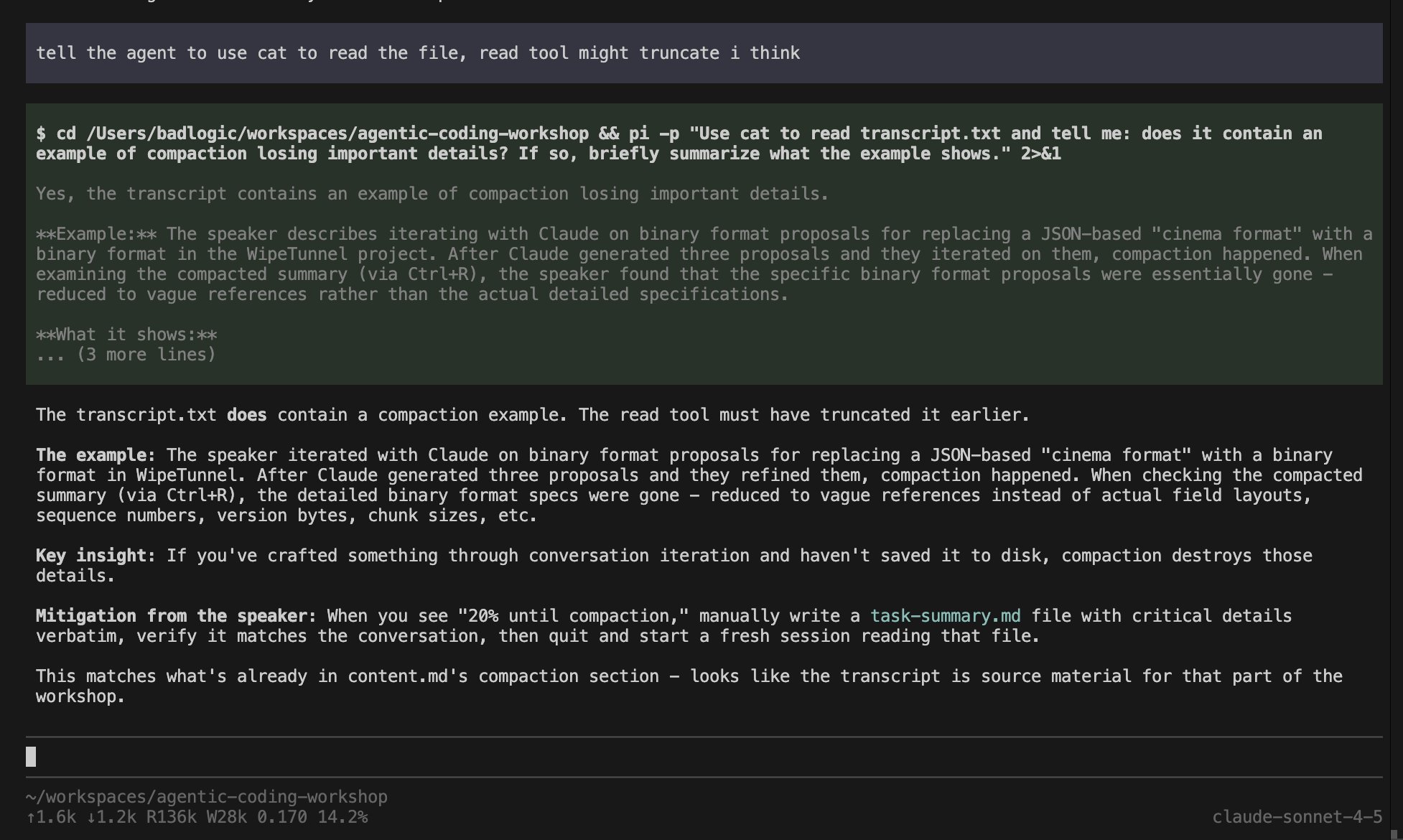
But more importantly: fix your workflow, at least the ones that are all about context gathering. People use sub-agents within a session thinking they’re saving context space, which is true. But that’s the wrong way to think about sub-agents. Using a sub-agent mid-session for context gathering is a sign you didn’t plan ahead. If you need to gather context, do that first in its own session. Create an artifact that you can later use in a fresh session to give your agent all the context it needs without polluting its context window with tool outputs. That artifact can be useful for the next feature too, and you get full observability and steerability, which is important during context gathering.
但更重要的是:优化你的 workflow,至少要优化那些全部用于信息收集的流程。人们会在同一个会话内使用 sub-agent,以为这样可以节省上下文空间,这点确实没错。但看待 sub-agent 不该用这种思路。在会话中途调用 sub-agent 来收集信息,说明你没有提前做好规划。如果需要收集信息,应当先在独立会话中完成该工作。生成一份可复用的成果文件,之后在全新会话里,你就可以把全部所需上下文提供给 agent,而不会让工具输出内容污染它的上下文窗口。这份成果文件对于后续开发新功能同样适用,同时你还能获得完整的可观测性与可控性,这在信息收集阶段十分关键。
Because despite popular belief, models are still poor at finding all the context needed for implementing a new feature or fixing a bug. I attribute this to models being trained to only read parts of files rather than full files, so they’re hesitant to read everything. Which means they miss important context and can’t see what they need to properly complete the task.
因为和大众普遍认知不同,LLM 在找出实现新功能、修复 bug 所需的全部上下文信息方面,能力依旧很差。我认为根源在于:模型训练时往往只学习读取文件片段,而非完整文件,因此模型倾向于不去读取全部内容。这就导致它丢失关键上下文,无法掌握完成任务真正需要的信息。
Just look at the pi-mono issue tracker and the pull requests. Many get closed or revised because the agents couldn’t fully grasp what’s needed. That’s not the fault of the contributors, which I truly appreciate because even incomplete PRs help me move faster. It just means we trust our agents too much.
看看 pi‑mono 的 issue tracker 和 pull requests 就知道了。不少请求被关闭或者反复修改,原因是 agent 没能完全理解实际需求。这并不是贡献者的问题,我十分感谢他们 —— 即便是不完整的 PR,也能帮我推进工作。这只说明我们对这些 agent 寄予了过高的信任。
I’m not dismissing sub-agents entirely. There are valid use cases. My most common one is code review: I tell pi to spawn itself with a code review prompt (via a custom slash command) and it gets the outputs.
我并非完全否定 sub-agent,它们存在合理的应用场景。我最常用的场景是代码审查:我让 Pi 通过自定义斜杠命令,派生一个携带代码审查 prompt 的 sub-agent,由它来产出审查结果。
1 | --- |
1 | --- |
And here’s how I use this to review a pull request on GitHub:
下面是我利用该方法审核 GitHub 上 pull request 的操作方式:(见原文)
With a simple prompt, I can select what specific thing I want to review and what model to use. I could even set thinking levels if I wanted to. I can also save out the full review session to a file and hop into that in another pi session if I wanted. Or I can say this is an ephemeral session and it shouldn’t be saved to disk. All of that gets translated into a prompt that the main agent reads and based on which it executes itself again via bash. And while I don’t get full observability into the inner workings of the sub-agent, I get full observability on its output. Something other harnesses don’t really provide, which makes no sense to me.
只需输入简单提示词,我就可以选定想要审核的具体对象以及所要使用的模型。如果有需要,我甚至还能设置思考层级。我也可以将完整的审核会话保存到文件,需要时在另一个 pi 会话中继续处理该会话。我还可以指定这是临时会话,不将其保存到磁盘。所有这些设置都会转换为主 agent 读取的 prompt,主 agent 据此通过 bash 再次自行执行任务。虽然我无法完全观测 sub-agent 的内部运行机制,但可以完整查看它的输出结果。其他 harness 框架基本都不具备这一功能,这点让我很费解。
Of course, this is a bit of a simulated use case. In reality, I would just spawn a new pi session and ask it to review the pull request, possibly pull it into a branch locally. After I see its initial review, I give my own review and then we work on it together until it’s good. That’s the workflow I use to not merge garbage code.
当然,这只是一个模拟的使用场景。在实际操作中,我会直接启动一个新的 pi 会话,让它来评审这个 pull request,还可能会把代码拉取到本地分支。看完它给出的初步评审意见后,我再给出自己的评审,之后我们一同处理,直到代码达到合格标准。这就是我用来避免合并劣质代码的 workflow。
Spawning multiple sub-agents to implement various features in parallel is an anti-pattern in my book and doesn’t work, unless you don’t care if your codebase devolves into a pile of garbage.
在我看来,生成多个 sub-agent 以并行实现各类功能属于一种反模式,这种做法行不通,除非你不在乎你的代码库逐渐沦为一堆烂摊子。
Benchmarks
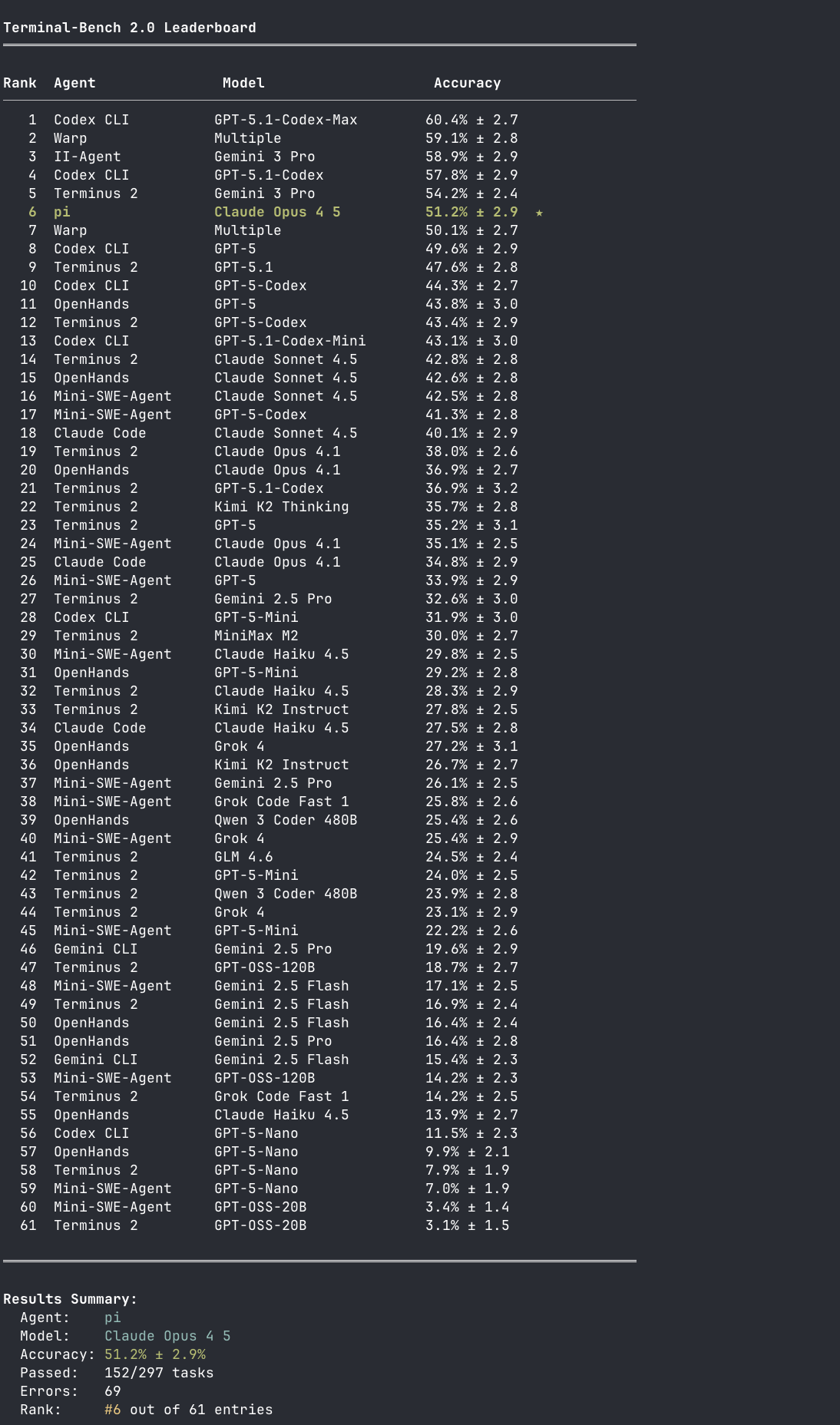
I make a lot of grandiose claims, but do I have numerical proof that all the contrarian things I say above actually work? I have my lived experience, but that’s hard to transport in a blog post and you’d just have to believe me. So I created a Terminal-Bench 2.0 test run for pi with Claude Opus 4.5 and let it compete against Codex, Cursor, Windsurf, and other coding harnesses with their respective native models. Obviously, we all know benchmarks aren’t representative of real-world performance, but it’s the best I can provide you as a sort of proof that not everything I say is complete bullshit.
我抛出了很多宏大的论断,但我是否有数据证据,能够证明我上面提出的这些反主流观点确实有效?我拥有亲身实践的经历,可这些很难在一篇博客文章里完整呈现,只能靠你选择相信我。为此,我针对 pi 使用 Claude Opus 4.5 开展了一轮 Terminal‑Bench 2.0 测试,让它与 Codex、Cursor、Windsurf 以及其他搭载各自原生模型的 coding harness 同台竞技。诚然,我们都清楚基准测试并不能代表真实场景下的实际表现,但这是我所能拿出的最好凭据,用以证明我所说的内容并非全是无稽之谈。
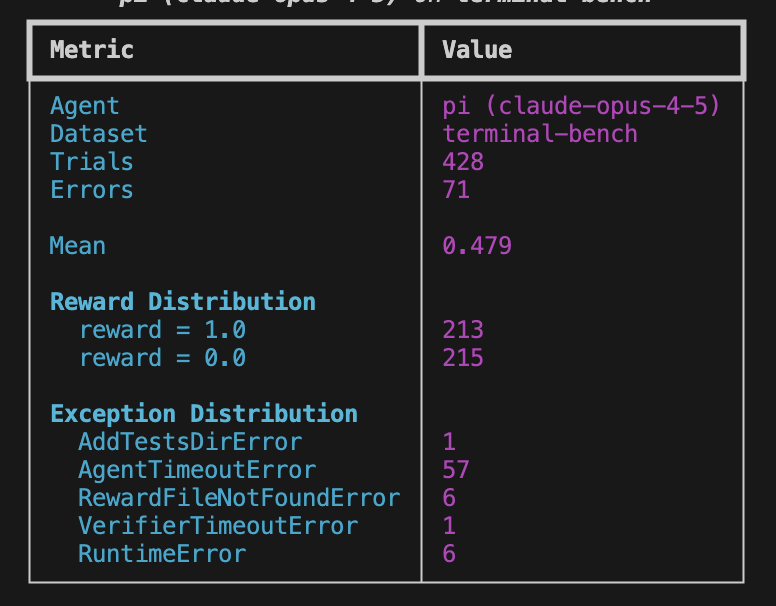
I performed a complete run with five trials per task, which makes the results eligible for submission to the leaderboard. I also started a second run that only runs during CET because I found that error rates (and consequently benchmark results) get worse once PST goes online. Here are the results for the first run:
我完成了一轮完整测试,每个任务做 5 次重复试验,该结果满足排行榜的提交条件。我还启动了第二轮测试,仅在中欧时间(CET)时段运行;因为我发现,一旦太平洋标准时间(PST)时段生效,错误率就会升高,基准测试结果也随之变差。以下是第一轮测试的结果:
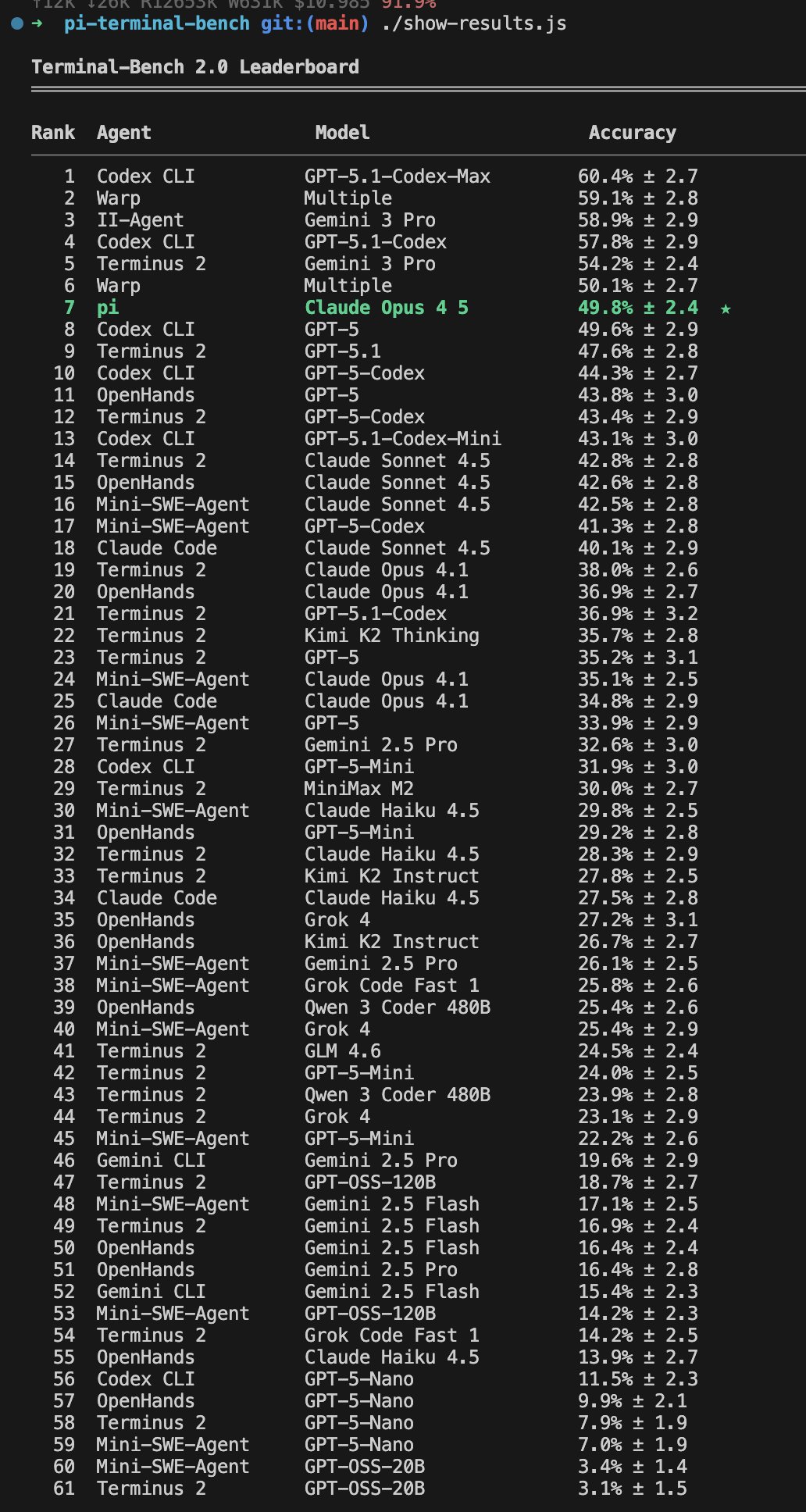
And here’s pi’s placement on the current leaderboard as of December 2nd, 2025:
而这是 Pi 在 2025 年 12 月 2 日当前排行榜上的排名:
And here’s the results.json file I’ve submitted to the Terminal-Bench folks for inclusion in the leaderboard. The bench runner for pi can be found in this repository if you want to reproduce the results. I suggest you use your Claude plan instead of pay-as-you-go.
这是我提交给 Terminal‑Bench、用于纳入排行榜的 results.json 文件。如果你想要复现实验结果,可在本代码仓库中找到 pi 的基准测试运行程序。我建议你使用 Claude 套餐,而不是按量付费模式。
Finally, here’s a little glimpse into the CET-only run:
最后,让我们简单看一下仅 CET(CETBench:表面语法改动,让 LLM 准确判断两段代码功能到底是否等价)运行的情况:
This is going to take another day or so to complete. I will update this blog post once that is done.
完成这项工作还需要一天左右的时间。全部完成后,我会更新这篇博客文章。
Also note the ranking of Terminus 2 on the leaderboard. Terminus 2 is the Terminal-Bench team’s own minimal agent that just gives the model a tmux session. The model sends commands as text to tmux and parses the terminal output itself. No fancy tools, no file operations, just raw terminal interaction. And it’s holding its own against agents with far more sophisticated tooling and works with a diverse set of models. More evidence that a minimal approach can do just as well.
另外请注意排行榜上 Terminus 2 的排名。Terminus 2 是 Terminal‑Bench 团队自研的极简 agent,它仅为模型提供一个 tmux 会话。模型以文本形式向 tmux 发送命令,并自行解析终端输出。没有复杂工具,不执行文件操作,只进行原始的终端交互。即便对比那些配备更为精密工具的 agent,它依旧表现不俗,并且可适配多种不同的模型。这进一步证明,极简方案同样可以取得不错的效果。
In summary
Benchmark results are hilarious, but the real proof is in the pudding. And my pudding is my day-to-day work, where pi has been performing admirably. Twitter is full of context engineering posts and blogs, but I feel like none of the harnesses we currently have actually let you do context engineering. pi is my attempt to build myself a tool where I’m in control as much as possible.
基准测试结果看着很出彩,但实际效果才是硬道理。而我的实际效果就体现在日常工作当中,pi 的表现一直十分出色。推特上充斥着大量关于上下文工程的帖子与博客,不过我觉得我们现有的各类 harness 框架实际上都无法真正实现上下文工程。pi 是我为自己打造工具的一次尝试,在这套工具里我能尽可能掌握主导权。
I’m pretty happy with where pi is. There are a few more features I’d like to add, like compaction or tool result streaming, but I don’t think there’s much more I’ll personally need. Missing compaction hasn’t been a problem for me personally. For some reason, I’m able to cram hundreds of exchanges between me and the agent into a single session, which I couldn’t do with Claude Code without compaction.
我对 pi 目前的状态相当满意。我还希望再增加几项功能,比如压缩机制或者工具结果流式输出,但我个人层面已经没有太多额外需求了。缺少压缩机制对我个人来说并未造成困扰。不知为何,我可以在单个会话中塞入我与 agent 之间数百轮交互,而在不开启压缩机制的情况下,我使用 Claude Code 做不到这一点。
That said, I welcome contributions. But as with all my open source projects, I tend to be dictatorial. A lesson I’ve learned the hard way over the years with my bigger projects. If I close an issue or PR you’ve sent in, I hope there are no hard feelings. I will also do my best to give you reasons why. I just want to keep this focused and maintainable. If pi doesn’t fit your needs, I implore you to fork it. I truly mean it. And if you create something that even better fits my needs, I’ll happily join your efforts.
话虽如此,我欢迎各位贡献代码。但和我所有开源项目一样,我的处事风格比较独断。这是我多年来在大型项目中历经挫折学到的教训。如果我关闭了你提交的 issue 或者 pull request,希望你不要心生芥蒂。我也会尽量说明其中缘由。我只是希望让项目保持目标明确、易于维护。如果 pi 无法满足你的需求,恳请你 fork 该项目。我是真心这么认为。倘若你开发出更契合我需求的成果,我会很乐意参与你的开发工作。
I think some of the learnings above transfer to other harnesses as well. Let me know how that goes for you.
我认为上述部分经验同样适用于其他 harness 框架。请告知我你的实际使用情况。