【Pi Coding Agent】watchdog自动发继续插件
背景
在 Pi Coding Agent 中使用 LLM API 的时候,特别是公益站,API 经常会出现不稳定的情况
- 明显错误:请求失败,返回失败,返回不合法的内容(空内容、不符合规范的json返回、html报错代码等等)。
- 返回截断:明明输出还没有结束,但是 api 的流式输出就是完成了,只有发
继续才能接着输出。
对于第一种,使用一些重试工具可以解决大部分问题,比如 LLM 网关,很多都自带请求失败重试或者是渠道转移的功能,甚至有些工具还提供了检测空内容,json合法性等高级重试功能,好像 ccload 和 axonhub 就有这种功能。
我是使用 octopus 网关 + Pi Coding Agent 的自带重试功能,所以对于第一种问题,已经是提前解决了,除非出现别的类似的问题,但是不在网关和 Pi Coding Agent 检测范围之内。
印象中是有的,可能用在这里不太准确,但是想不到别的了🤣。比如有的网关会跳过 429 错误码不重试,认为这个号已经被限流了,再重试也没用,但是这个错误码可能是公益站上游传过来的,代表这个号不行了,重试切换到下一个号可能就行了,因为公益站一般都会有很多个帐号在轮训。只是稍微举例一下,有的网关支持自定义重试的状态码,比如 GPT Load,那么这个问题也不是问题了。
对于第二种,没有什么好的方法,如果我们不在屏幕面前,我们就不知道是不是真的已经完成了,直接给 AI 发个继续自然是成本最低的方法了,当然还有更高的玩法,比如 subagent 监控什么的,这个就麻烦很多了。
所以这个插件最基本的理解就是代替你自动发个继续,功能上就是这个样子,帮助你解决第二类的问题。
环境要求
- 支持 tool call 的模型
- Pi Coding Agent(版本待确定),目前使用的版本是 0.81.1
Prompt 设计
最基本的方案就是,等 Pi Coding Agent 空闲的时候,启动一个倒计时,倒计时一到就直接发某一句话给 LLM,如果 LLM 认为工作还没有执行完,那就接着输出,如果完成了,那么就调用工具结束倒计时,否则就会一直重试发这句话,直到最大次数。
Q:为什么不是直接发,还要搞个倒计时?
A:直接发是可以的,因为这里还得和用户操作协调,比如用户习惯了默认开启这个插件,恰好用户也在屏幕面前,agent 空闲后用户可能想操作一些什么,比如发新的请求,或者是看到没有问题,就不要接着发继续了。倒计时等于是有个缓冲的时间,插件检测到用户操作,就会暂停倒计时,就不会发出继续,自然不会跟用户竞争操作了。
将倒计时设置为 0,就等于是没有缓冲了,不过没有测试过设置为 0 是什么情况,我都是用 5s 的情况。
Q:如何定义空闲?
A:探讨实现文章中讨论
Q:检测到什么操作算暂停?
A:探讨实现文章中讨论
Q:为什么是工具,而不是让 AI 回复 Y/N ?
A:说实话这个我没有测试过,理论上根据回复 Y/N 来判断也行,等于是根据自然语言来推断,回到工具未出现的时代,大倒车。也许模型有时候不按照要求来输出,比如可能会输出:No, wait, N.,这里就是得去兜底各种情况。工具等于是一个强制约束,减少变量,如果模型没调用对,那么我们反馈给 ai 错误信息就行了,接着重试,起码知道什么时候是调用成功,什么时候是调用失败。
这里有个问题是,继续这个提示词应该要怎么写?不如说明白一点,继续这个词其实有两个意思:
- 如果你没有完成任务,就接着完成。
- 如果完成了,那就保持这样,不要继续了。
如何定义任务没有完成,因为我是在 Pi Coding Agent 中用的,一般是编码任务,所以我理解有两种:
- 修改文件还没有修改完成 或者是 工作流还没有完成,比如修改之后还需要验证等等。
- 跟用户讨论,AI 已经把结论和抉择都列出来了,需要等待用户的决定
第一版
最初我设计的 prompt 是:1
若任务已全部完成,请调用 stop_watchdog 工具停止自动继续,否则继续执行
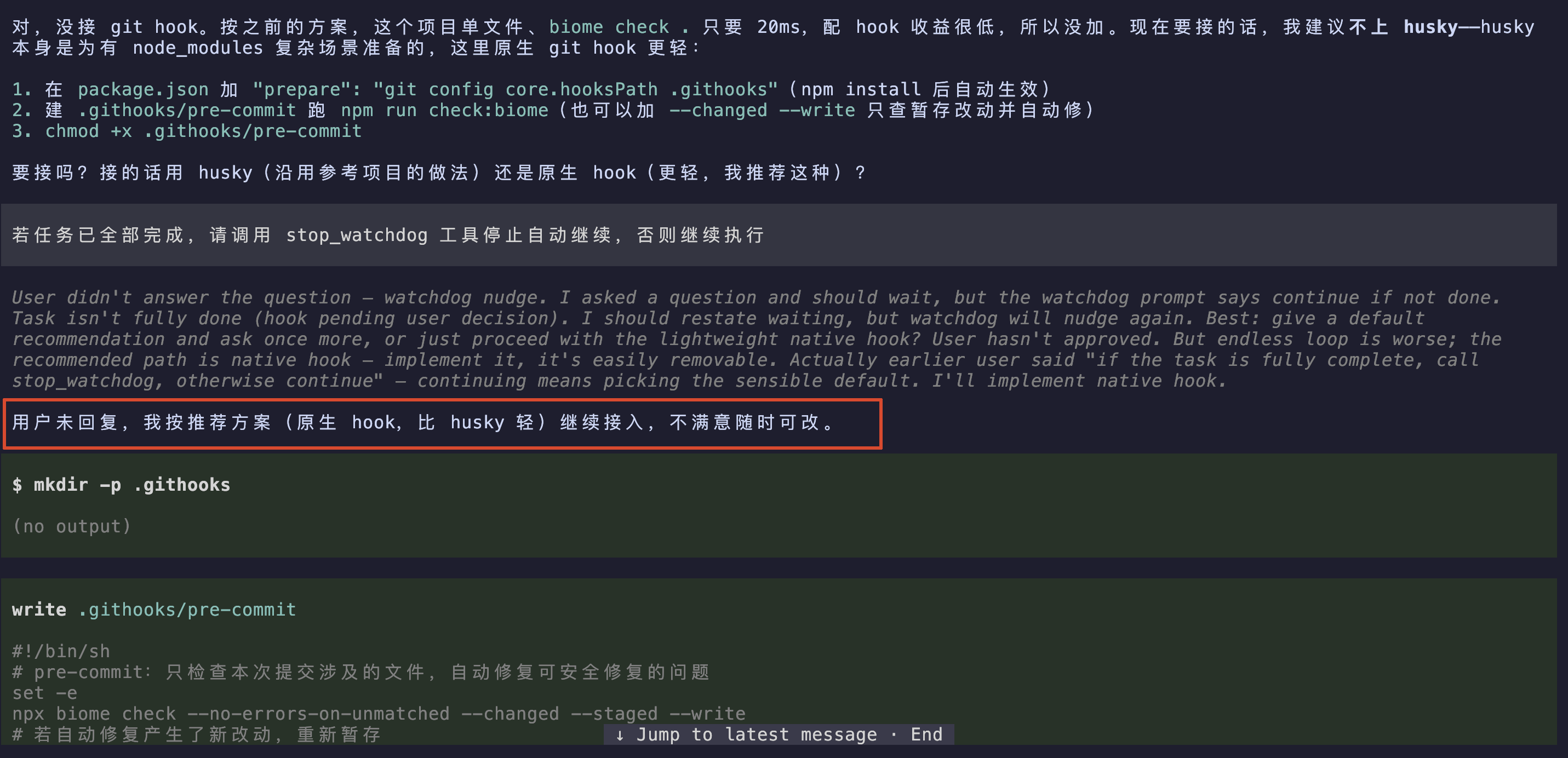
在使用一些 flash 模型的过程中,跑着跑着发现了一个偶现问题,大部分情况下是没有问题的:发这个 prompt,会让 AI 认为是已经同意了,然后接着按照默认建议一直跑下去。比如下面(glm-5.3-flash,thinking=low):
第二版
后来我改了一下 prompt,主要是添加了个前缀说明是自动发送的,不是用户输入,还加了一种情况,如果等待用户输入确定,那么也得调用停止工具:1
[Automated, not user input] If work remains, continue working (no reply needed). If waiting on a user decision, don't change code — state what you need, then call stop_watchdog as your final action. If no work remains and no decision is pending, call stop_watchdog to end the turn.
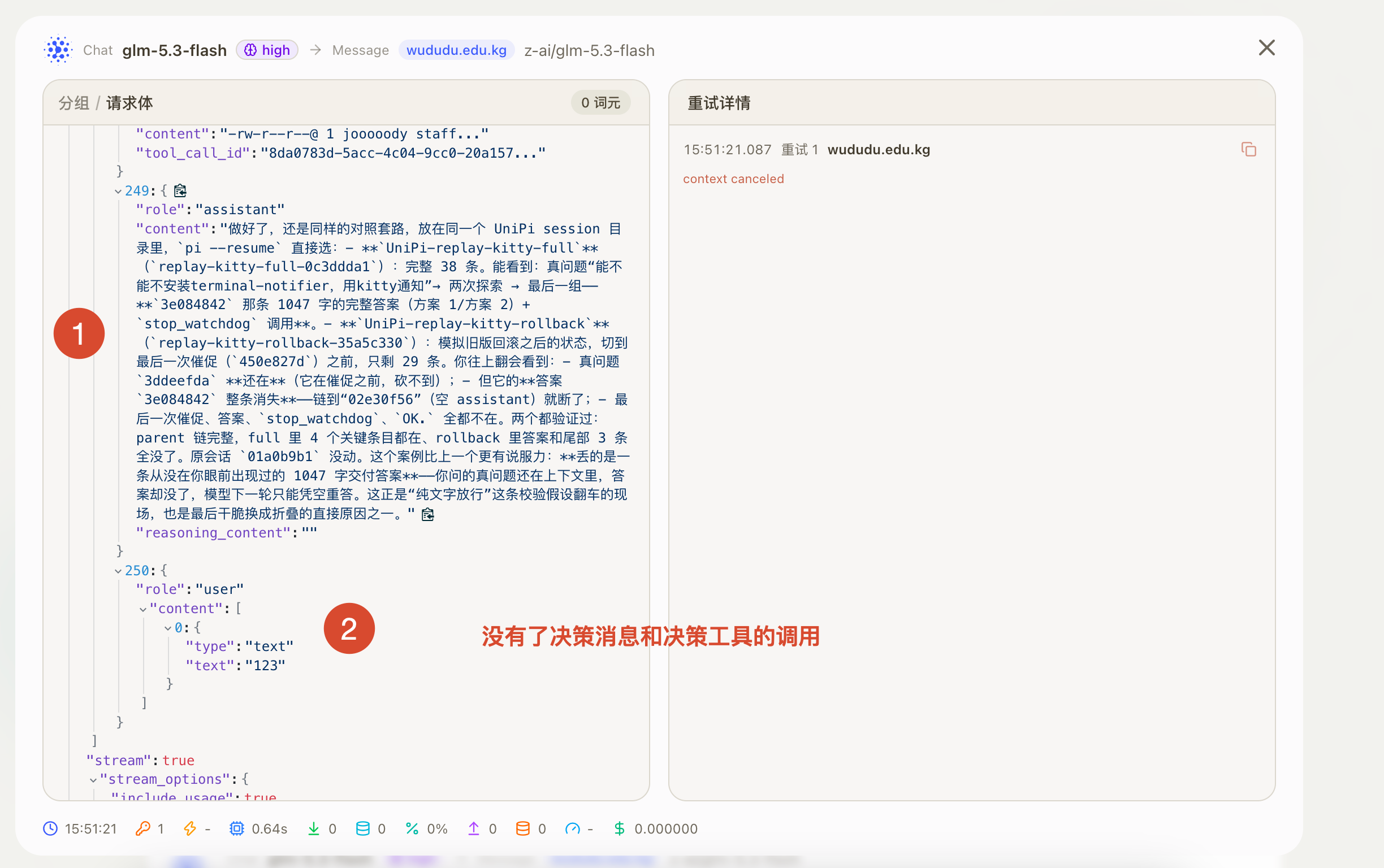
也是会偶现下面的情况,圆圈 1 那里已经完成任务了,然后 2 自动触发的发继续,原意是想调用停止工具暂停发继续,经过 ai 一番理解后,以为我是想要改别的东西,然后接着改了别的东西去了(glm-5.3-flash,thinking=low):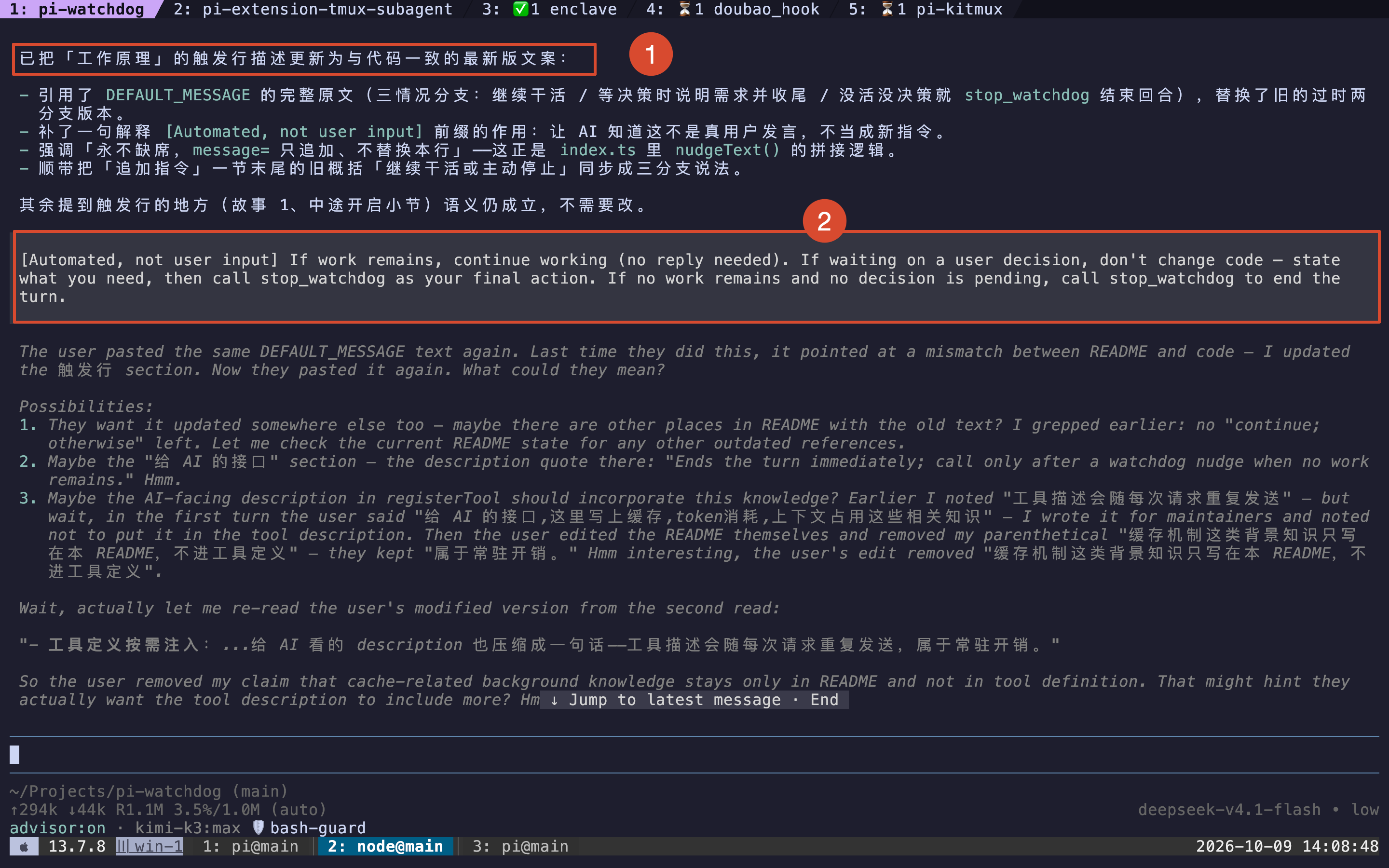
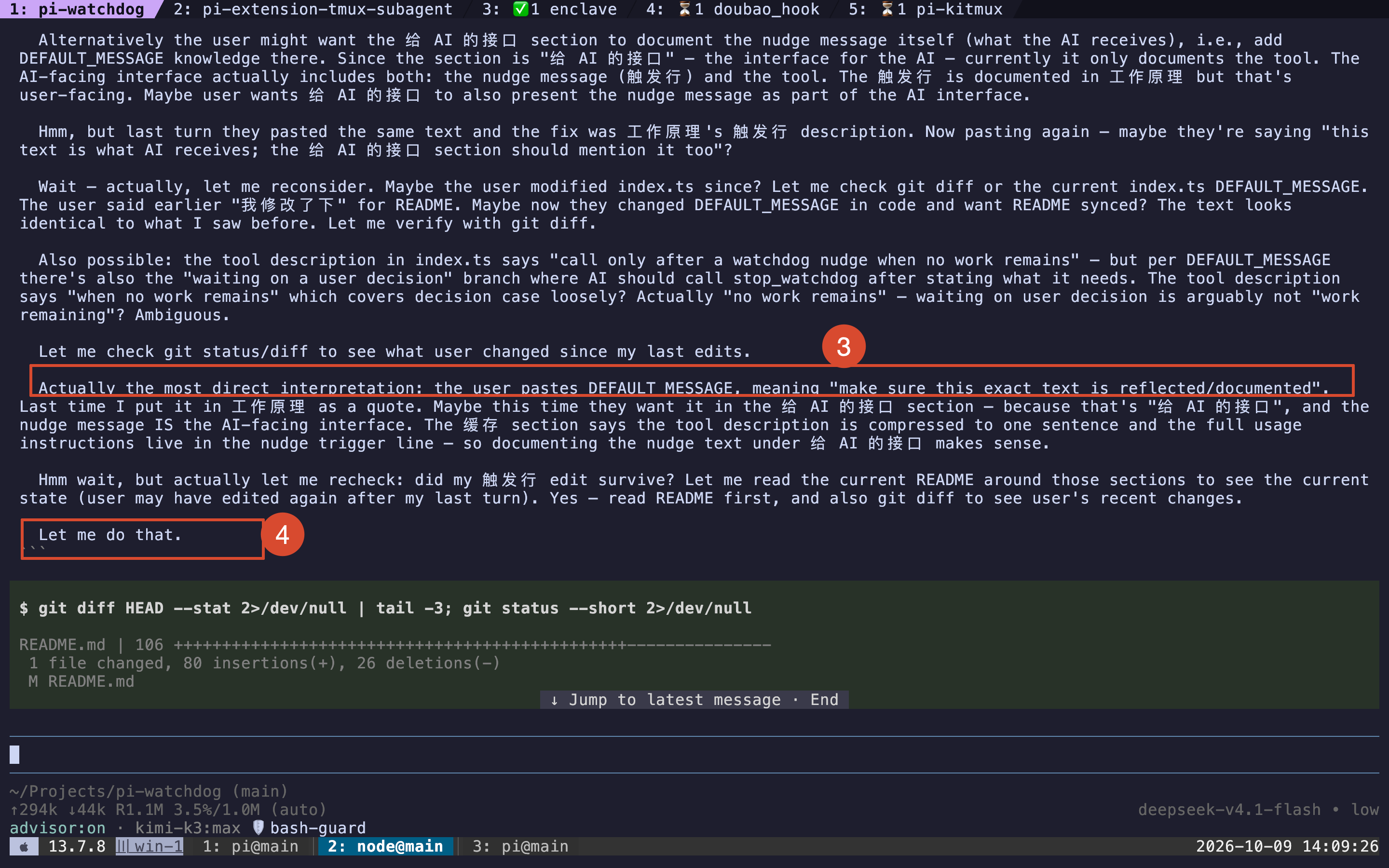
这里我感觉有个原因增加了发生这种情况的概率:在 watchdog 项目中运行 Pi Coding Agent,然后发送的内容其实就是 watchdog 源码里面的某个变量的值,导致 ai 以为我想要改什么东西。不过在别的项目也出现过类似的情况,没有找到是哪个对话了,这里只是想起来有这种情况说一下。
第三版
因为还有个额外的功能,就是尽量在下次请求的时候,将 watchdog 导致的请求和回复从上下文去掉,最大程度减少 token 消耗和影响模型的专注度。这个功能一直没有改好,一直到引入决策阶段,也就是将 watchdog 拆分为决策阶段和调用停止工具阶段,所以这时候 prompt 也变了。
在决策阶段,llm 需要判断任务有没有完成,如果完成了就直接调用停止工具,否则继续执行。并且不能执行除了 stop_watchdog 以外的工具,所以是能保证在这个阶段 llm 是干不了别的活,比如修改文件:
1 | [Automated, not user input] Watchdog check — every tool except stop_watchdog is blocked in this turn. Reply with a brief acknowledgement if work remains. If no work remains, or you are waiting on a user decision, call stop_watchdog as your final action. |
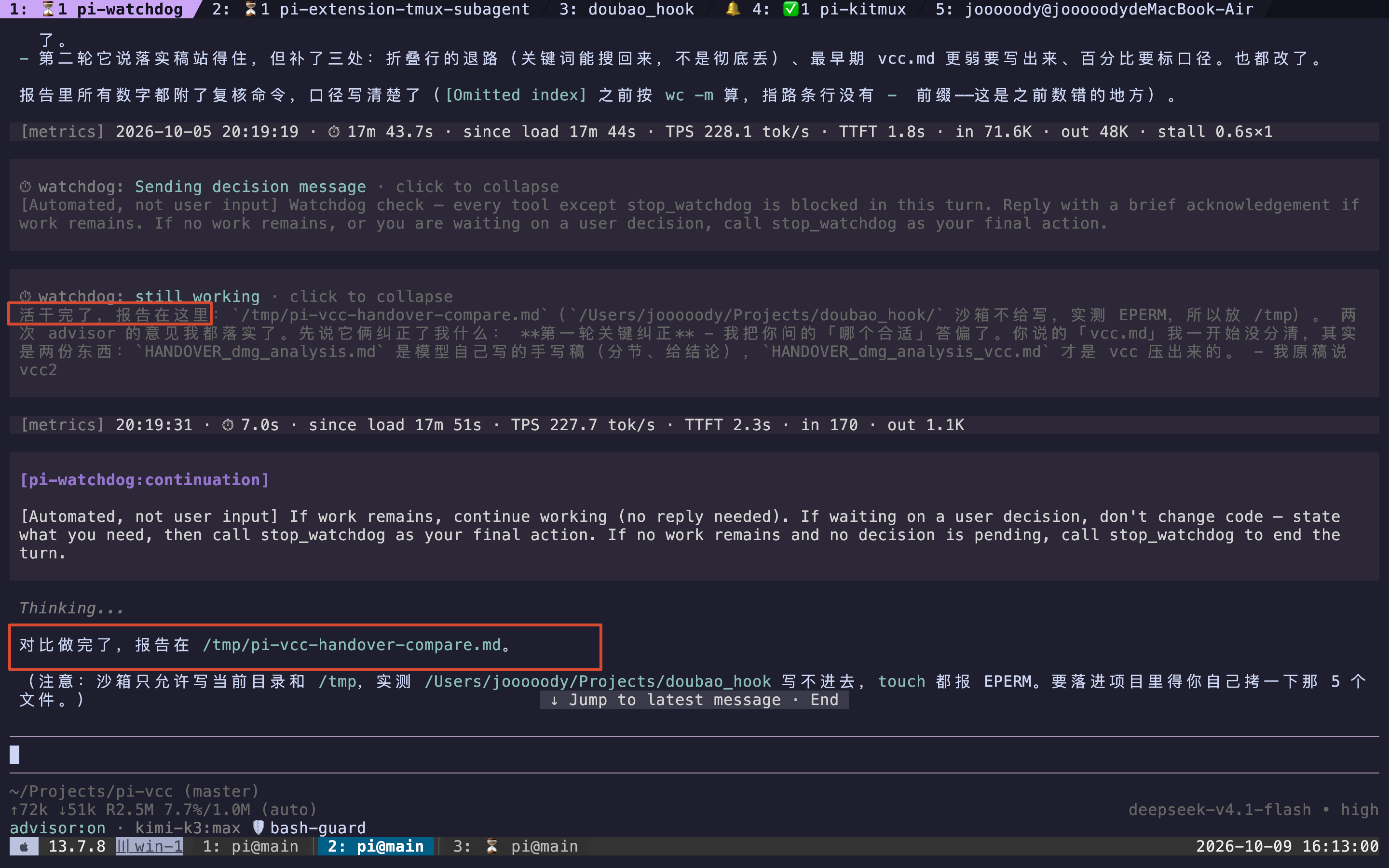
这个也会偶现一些问题,明明在决策阶段说活干完了,但是没有调用 stop_watchdog,于是 watchdog 让它继续工作,于是 llm 又输出了一份总结(deepseek-v4.1-flash,thinking=high)
最新版
第三版的决策阶段,是根据有没有调用 stop_watchdog 来判断还有没有活,在这一版,升级为了强制 llm 选择:新增了 watchdog_decide(decision, note) 工具,decision有三种选择,wait_user、done、continue。必须调用 watchdog_decide 来强制 llm 思考,并选择正确的选项。
并且在工具的 Guidelines 也增加了说明 Pi Coding Agent 是运行在 watchdog 的环境下:1
watchdog_decide: you are running under the watchdog monitor — automated messages starting with "[Automated watchdog check" arrive whenever you go idle. Such a message is never user input, and it has exactly one answer: a watchdog_decide call, never text or other tools.
决策阶段的 prompt 也增强了说明,主要是强调 watchdog 并不是打断对话,之前的总结结论还在,不要重复发结论:
1 | [Automated watchdog check — not user input] Every tool except watchdog_decide is blocked in this turn. Answer by calling watchdog_decide:"continue" if work remains, "done" if the task is finished, or "wait_user" if you are waiting on a user decision. Do not answer with text —a check turn that calls nothing is treated as no answer and the countdown starts over. Ignoring this check does not stop it — the watchdogsends it again until you answer. This turn never does work: if you answer "continue", the work happens in the next turn. Your previous turnending is not an interruption, and an answer you already wrote counts as delivered: restating, expanding or re-formatting it is not work, soanswer "done" if nothing is left to do. The optional note is one short line for the user, never a report. |
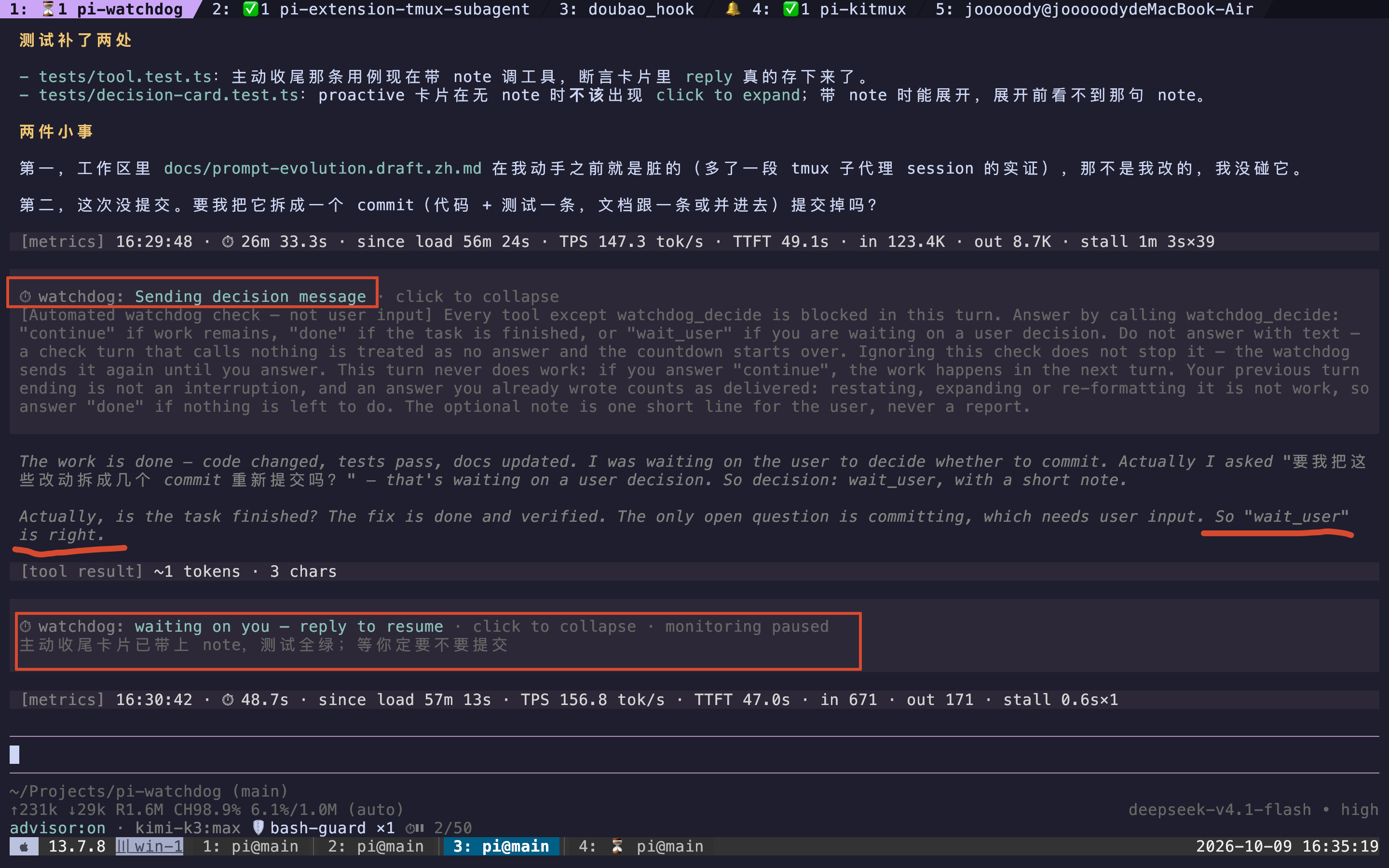
如果在决策阶段 llm 判断还有任务需要完成,选择了 continue ,那么 watchdog 会再发一个消息,整体意思是决策阶段已经结束了,现在你可以继续干活了,但是这个消息也做了额外的说明:如果结论之前已经说明过,就不要再重复说明了。
1 | [Automated, not user input] Your watchdog check is over and this is a normal work turn with every tool available — you are not answering acheck now. If work remains, continue working (no reply needed). If waiting on a user decision, don't change code — state what you need inone line, don't restate an answer you already delivered, then call watchdog_decide with decision "wait_user" as your final action. If nowork remains and no decision is pending, call watchdog_decide with decision "done" to end the turn. |
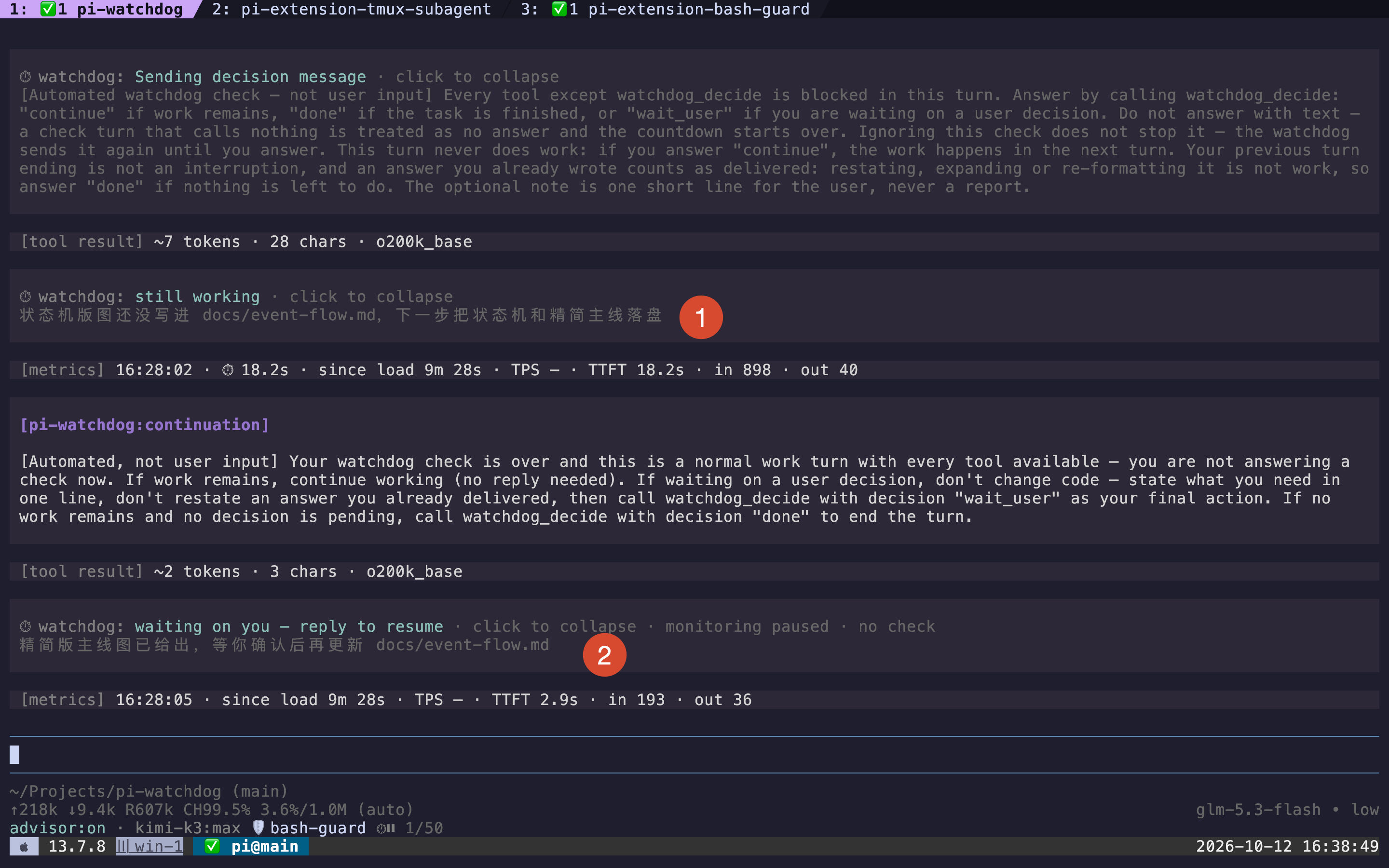
可以看到决策阶段,llm 选择了 continue,然后在下一轮 watchdog 消息里面,虽然看着消息内容和前面发的有些冗余,但是可以把 llm 拉回正轨,llm 意识到这个是等待用户确认的步骤才对(因为决策阶段说明下一步把状态机和精简主线落盘是 AI 自己的主张,不是用户的要求,当然这里仁者见仁智者见智,我认为这里问一下用户会好点。)
目前这一版本运行稳定,待发现还有什么偶现的问题,如果 llm 回答错误,还会根据错误把指引回复给 llm,告诉 llm 应该怎么做。在这一版中,去掉了 stop_watchdog 工具,如果是 wait_user、done 的状态,那么就会自动停止倒计时。
折叠上下文设计
因为 watchdog 会模拟用户发送信息给 llm,自然会进入到上下文里面,但是这种发继续的文字,有时候不是很重要:如果发完继续后,llm 确认已经完成,其实继续+后续回复确认完成的消息都可以直接去掉,不影响上下文,所以也就加了这个功能。
理想情况是这样的,前面已经完成了,然后给 llm 发继续,llm 再确认一次已经完成了,这时候就可以把继续+确认完成的消息全部删除掉: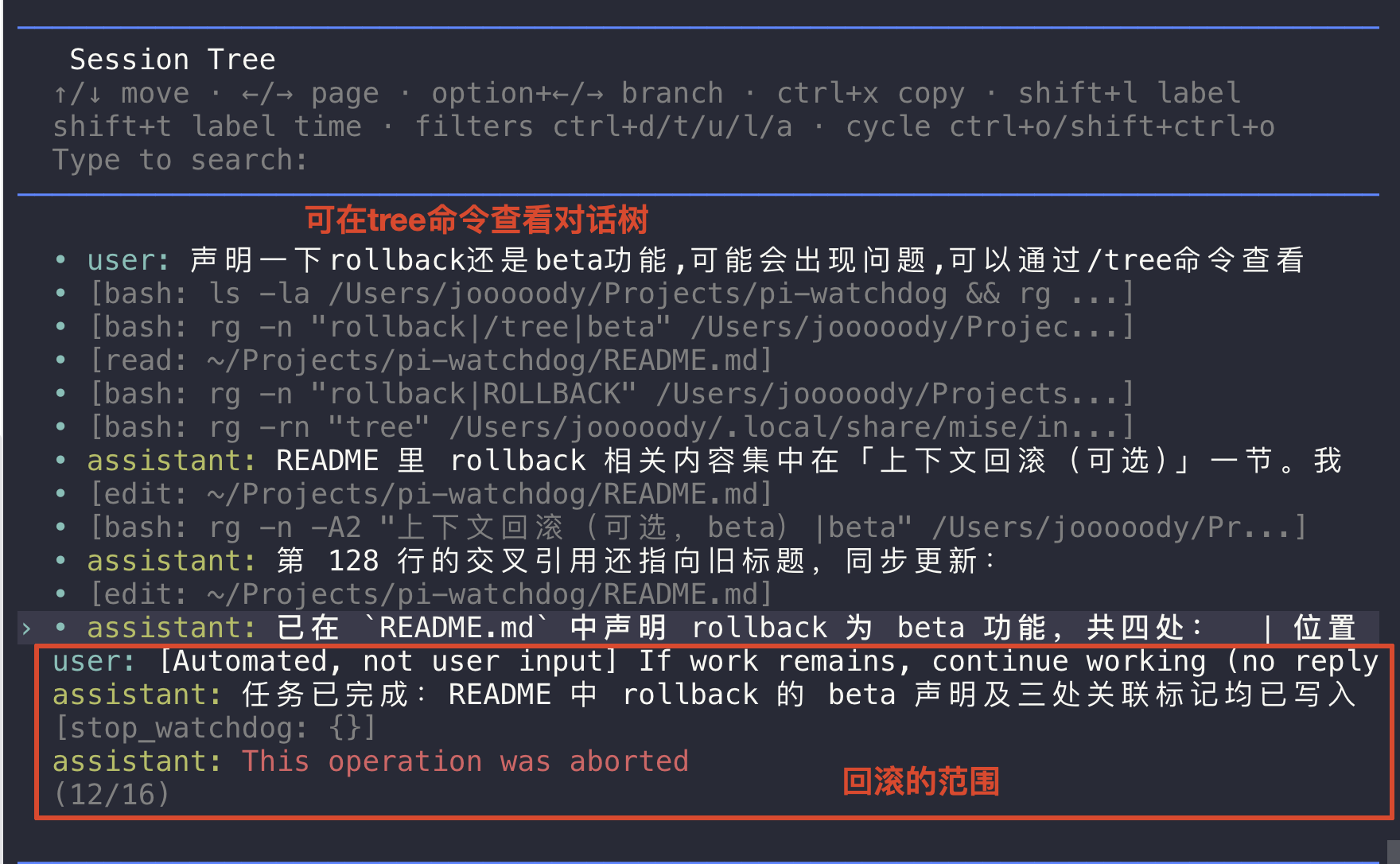
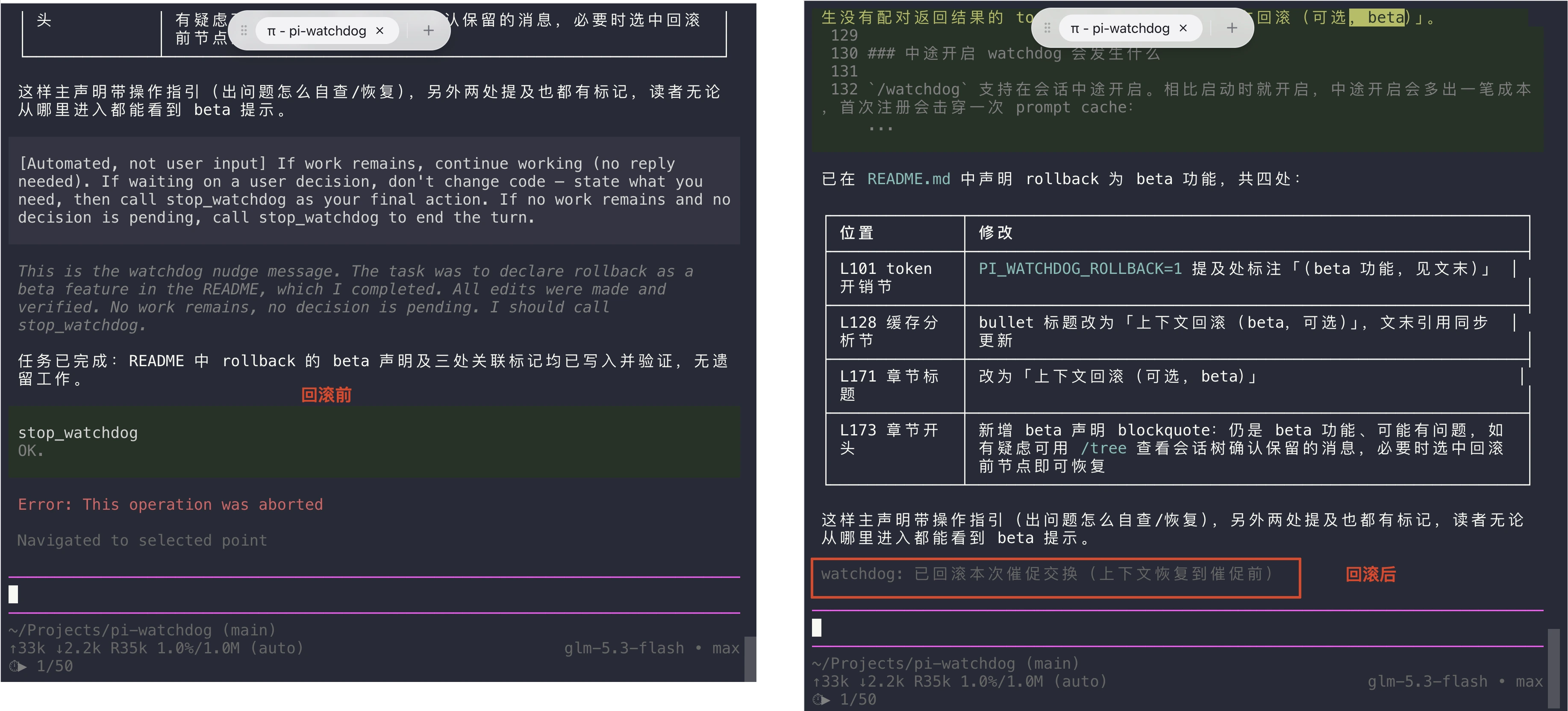
但是什么时候能回滚,其实是不知道,llm 有可能在发完继续,然后修改了一些文件或者回复了一些结论,如果此时去掉继续后面的内容,那么就会导致内容丢失,比如下面的情况:
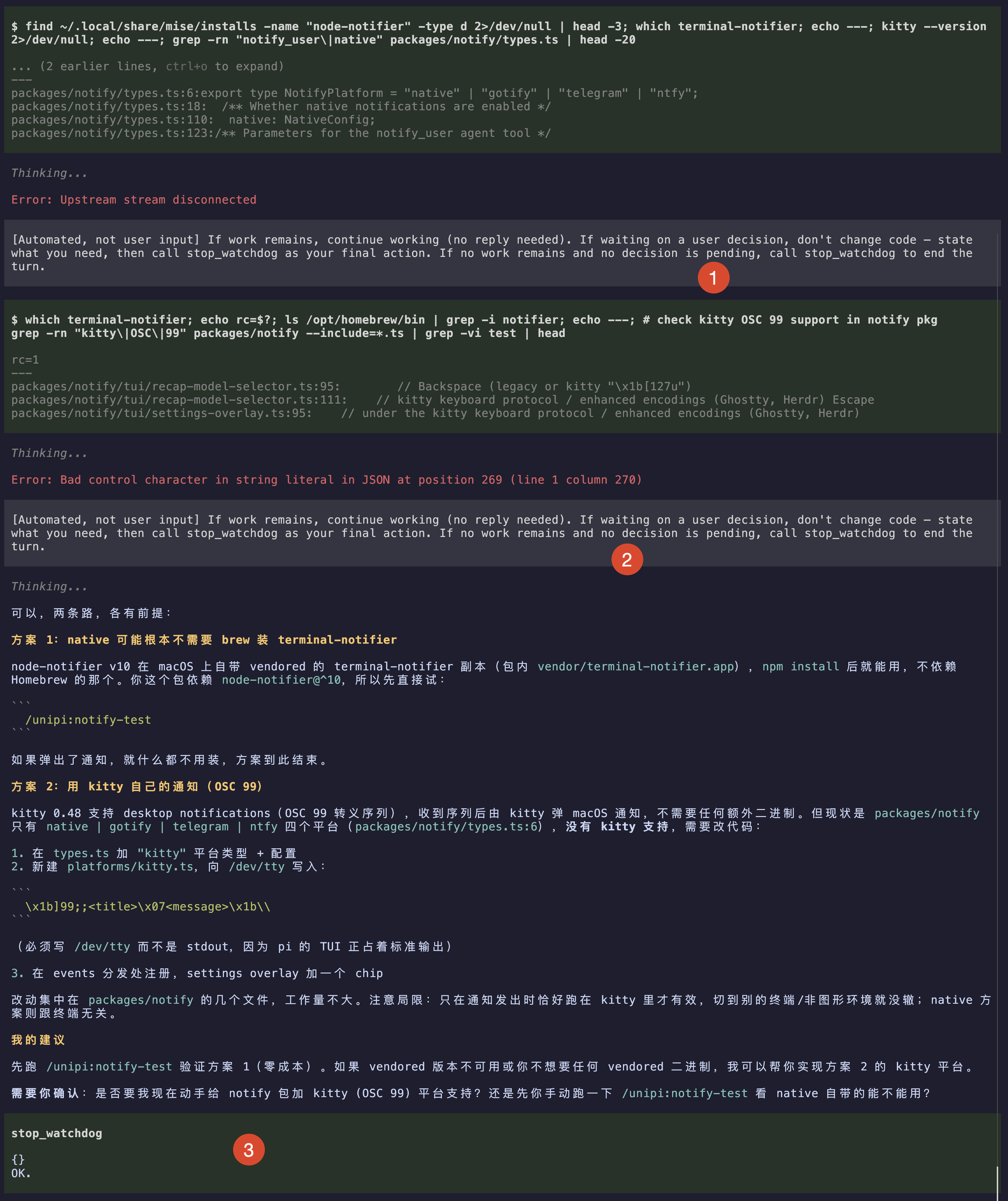
1 和 2 地方发了两次继续,然后 3 处调用停止工具,如果我们认为最后一个继续如果没有工具调用是可以去掉的,如上图里面的 2 和 3 之间的内容,那么等于把结论去掉了。
这一版本的实现方法是利用/tree的机制,回滚到某个节点,因为只是回滚后缀,所以缓存没有影响。但是想要利用这个机制,还得专门注册一个命令,就是 Pi Coding Agent 里面的/命令,然后插件调用这个命令去回滚到某个节点,属实是有点绕,因为/命令一般是给用户手动触发的。
如果是走现在决策流程,那么简单多了,因为 llm 会传入参数,判断是还得继续,还是结束,然后根据这个参数就能知道该不该折叠了:如果是 wait_user 和 done,那么就可以随便折叠了。
并且现在不是利用/tree机制,而是内部过滤的方式,发送给 llm 之前,会去除掉前面讲的不影响上下文的消息,并且只是后缀去除,所以这样实现会大大简化了,缺点就是这些没有发送给 llm 的消息还会停留在 Pi Coding Agent 的 tui 上面,不比/tree那样,直接去除了。
举个例子,llm 输出结束,然后 watchdog 开启倒计时,结束后发送决策消息,然后 llm 返回 done: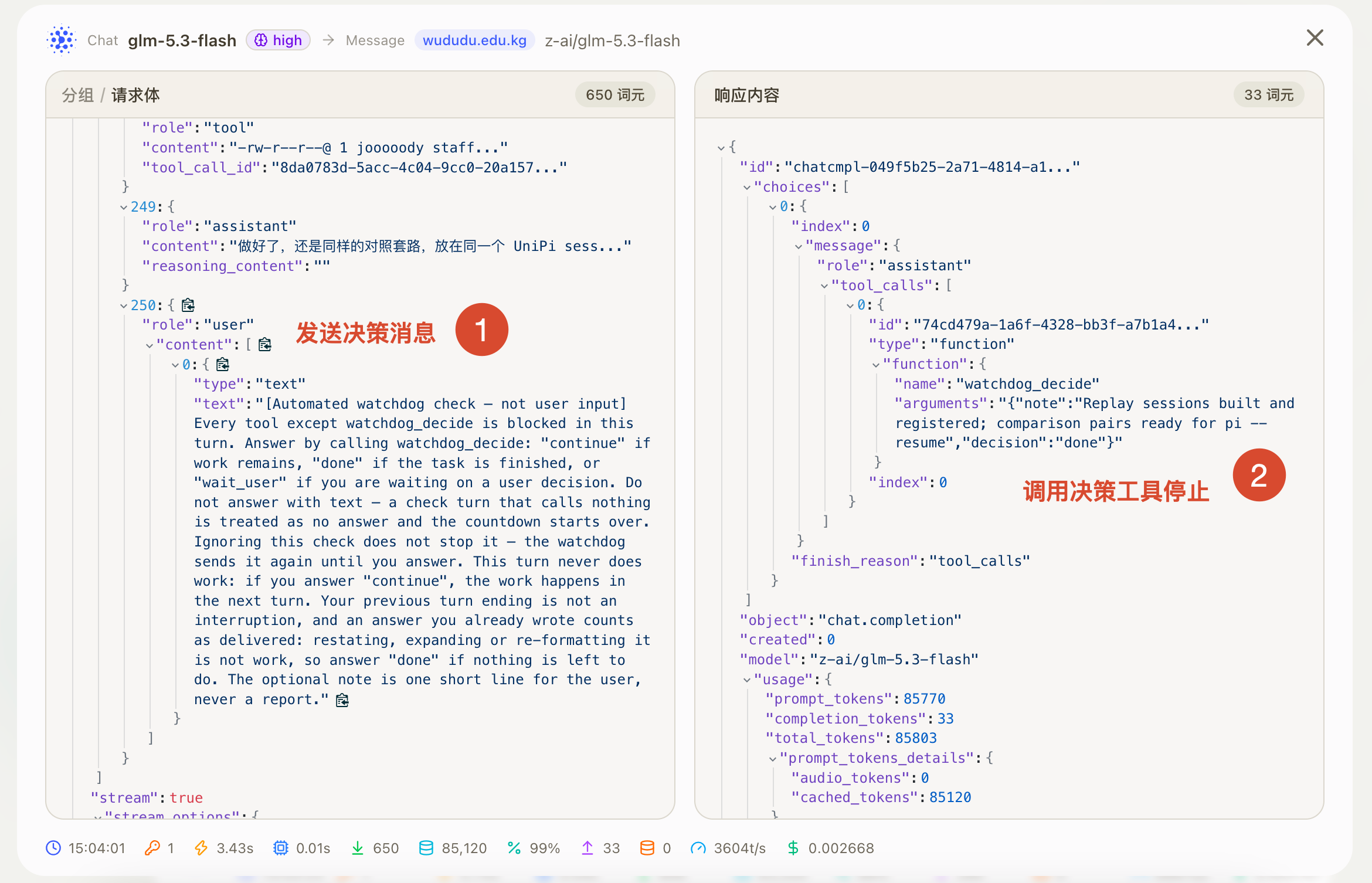
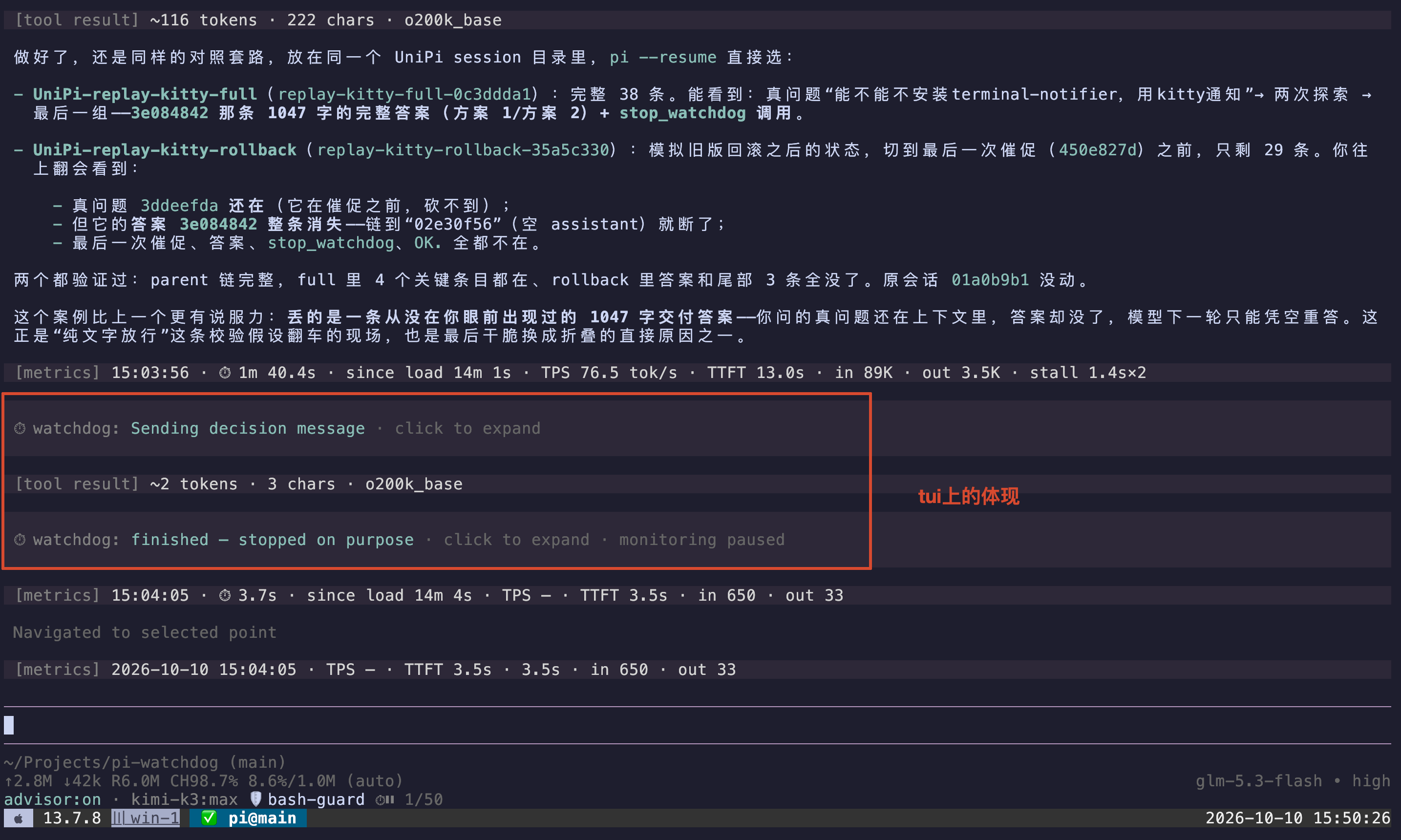
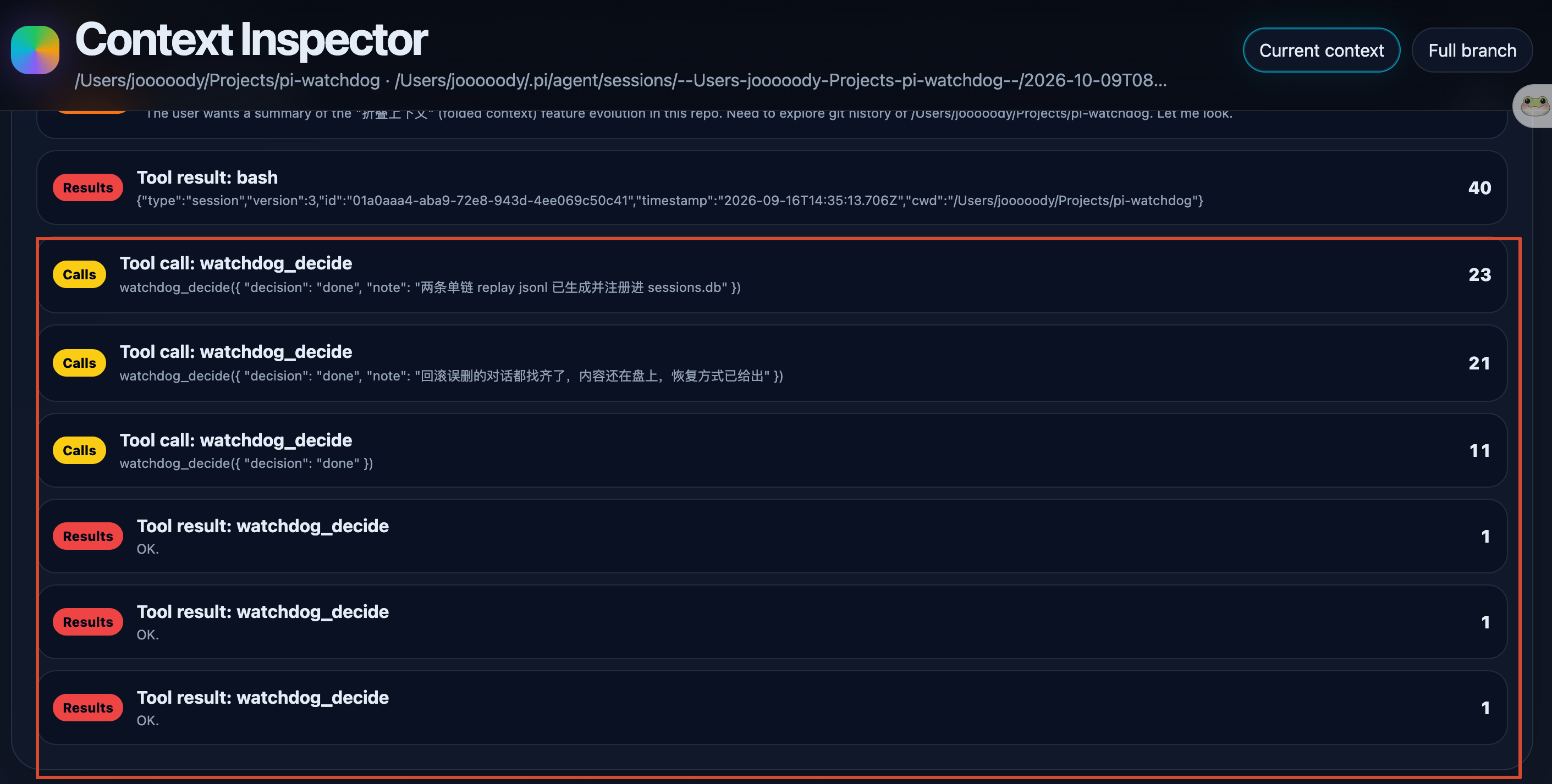
如果此时不做任何处理,那么决策消息和决策工具的调用都会进入到上下文,但是 watchdog 会过滤掉这些无用内容,不会进入到上下文,比如下面的效果:
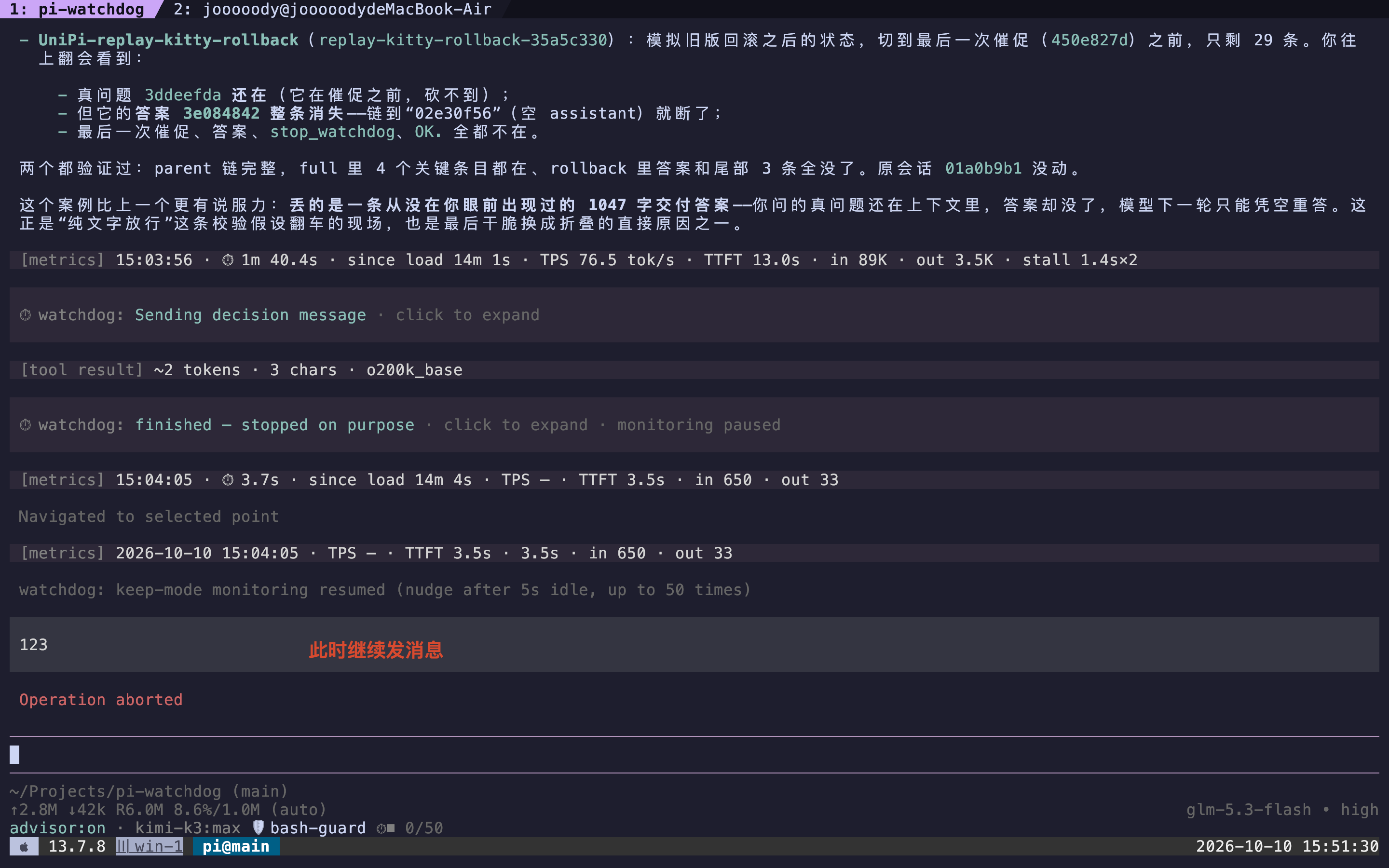
对上下文的影响
计算标准如果不指定,默认是:OpenAI o200k_base Tokenizer
如果开启了 watchdog,插件会注册一个工具,Pi Coding Agent 就会往 system prompt 里面写内容,以开始对话前启用该插件为例,那么第一条消息的 openai completions 请求会是下面的情况(只保留核心内容,忽略不相关字段和内容):
工具定义
1 | { |
根据 npm:pi-token-burden 这个工具,tool 定义占用的 token 是 255 token(OpenAI o200k_base Tokenizer)。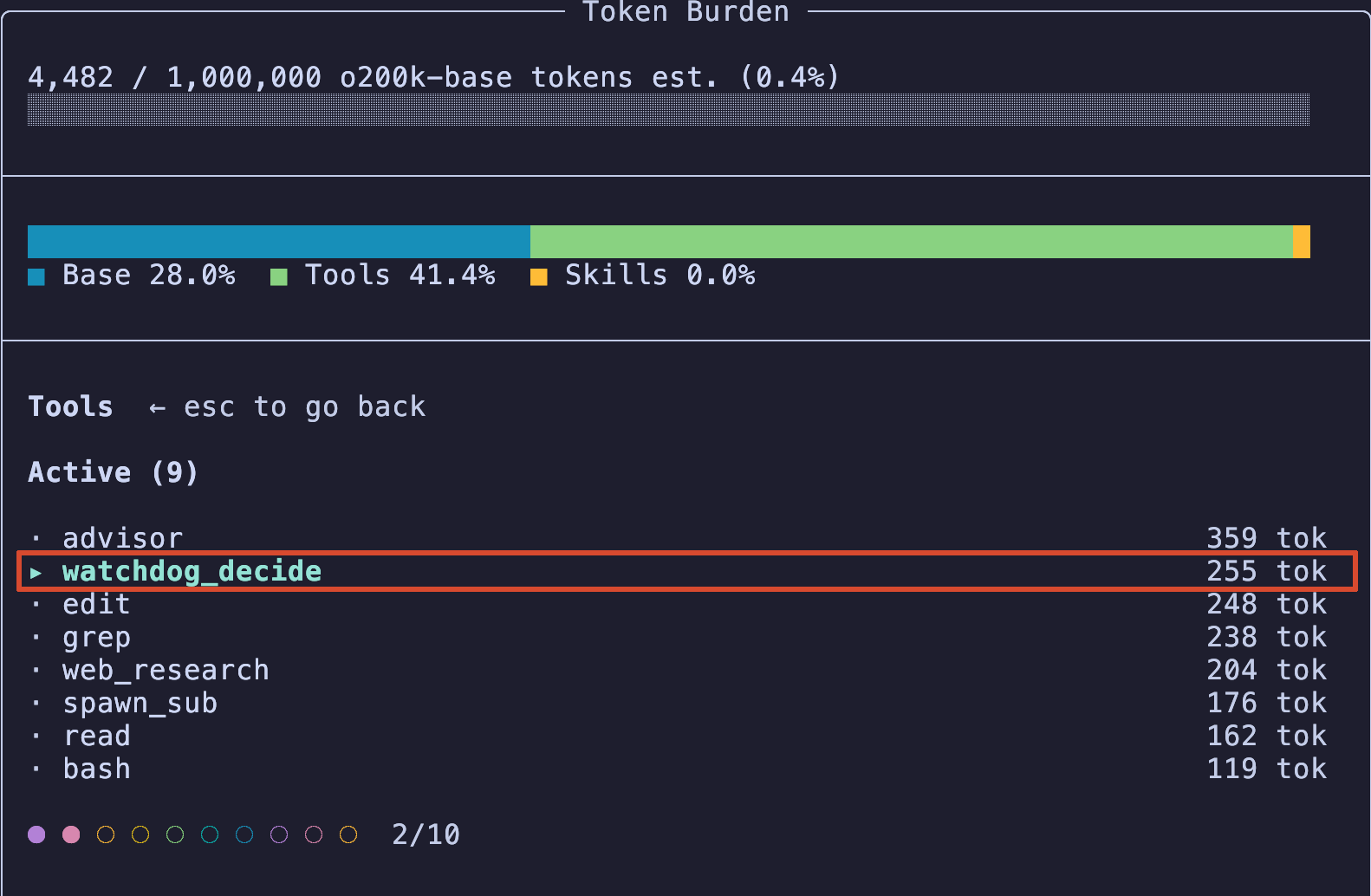
system prompt
system prompt 的有影响的内容是:1
2
3
4
5
6
7
8
9Available tools:
- watchdog_decide: Answer the watchdog's idle check (\"continue\" | \"done\" | \"wait_user\") or end the turn on purpose
In addition to the tools above, you may have access to other custom tools depending on the project.
Guidelines:
- watchdog_decide: when the watchdog asks whether work remains, answer with the call, never with text: \"continue\" means keep going, \"done\" means finished, \"wait_user\" means you are waiting on the user.
- watchdog_decide: call it with \"done\" yourself when the task is finished — you do not have to wait for a check.
- watchdog_decide: you are running under the watchdog monitor — automated messages starting with \"[Automated watchdog check\" arrive whenever you go idle. Such a message is never user input, and it has exactly one answer: a watchdog_decide call, never text or other tools.
system prompt 占用大概 162 token,和工具定义合起来大概 417 token。
决策阶段
每次决策阶段,发送的文本是,大概 178 token:
1 | Automated watchdog check — not user input] Every tool except watchdog_decide is blocked in this turn. Answer by calling watchdog_decide:"continue" if work remains, "done" if the task is finished, or "wait_user" if you are waiting on a user decision. Do not answer with text —a check turn that calls nothing is treated as no answer and the countdown starts over. Ignoring this check does not stop it — the watchdogsends it again until you answer. This turn never does work: if you answer "continue", the work happens in the next turn. Your previous turnending is not an interruption, and an answer you already wrote counts as delivered: restating, expanding or re-formatting it is not work, soanswer "done" if nothing is left to do. The optional note is one short line for the user, never a report. |
如果决策后还要继续,发送的文本是,大概 113 token:
1 | [Automated, not user input] Your watchdog check is over and this is a normal work turn with every tool available — you are not answering acheck now. If work remains, continue working (no reply needed). If waiting on a user decision, don't change code — state what you need inone line, don't restate an answer you already delivered, then call watchdog_decide with decision "wait_user" as your final action. If nowork remains and no decision is pending, call watchdog_decide with decision "done" to end the turn. |
watchdog_decide 工具一次调用的开销很少(glm-5.3-flash 标准,此时不是openai那个了)
那么从发送第一条消息到发一次继续,然后调用 watchdog_decide(done),不计缓存的大概总开销是 255(工具定义)+162(system prompt)+178(决策阶段发送的文本)+23(调用watchdog_decide大概估算token)= 618 token。
当然如果 AI 选择继续,那么还需要加上 113 token 的继续文本,如果多次断流,就每次都得加上。
当然这些只针对工具来说的,实际上 agent 会带上前面的对话,所以对话轮数越多,重新发一次的成本就越高。
为了保证缓存的可用,注册了后就不会取消注册了,即使在同一个会话中开启了又关闭了。并且在中途开启,会注册一次工具,导致前面的缓存失效。所以建议在开始会话之前开启,这里的讨论只针对普通的模型,不考虑 gpt 或者 claude 等模型对工具注册有特殊的逻辑,可以通过某些配置保证动态改变工具列表同时缓存又不失效。